How to Identify Bottlenecks in Business Processes

Many business process delays are only noticed when the final deadline is missed.
A customer request is late. An invoice is not approved on time. A purchase order waits too long. An employee request remains unresolved. Everyone knows the process is slow, but nobody can clearly say where it got stuck.
In many cases, the visible delay is only the last symptom. The process may have started losing time several steps earlier, long before the final deadline was at risk.
That is why identifying bottlenecks requires more than looking at the last delayed step. Teams need to understand where the flow of work first loses momentum.
You cannot improve a bottleneck you cannot see.
What is a bottleneck in a business process?
A business process bottleneck is a point where the flow of work slows down, accumulates, returns for correction, or stops moving forward.
It may be an approval that waits too long, a handoff with unclear ownership, a task blocked by missing information, a team with more work than it can process, or an exception that repeatedly requires manual coordination.
A bottleneck is not always the longest task. It is the point that limits the progress of the whole process.
For example, a finance approval may appear to be the problem because requests wait there for several days. But the root cause may be that requests arrive with missing documents, incorrect values, or unclear authorization rules. In that case, the approval step is where the delay becomes visible, not necessarily where it begins.
Common signs of bottlenecks in business processes
Before trying to redesign or automate a process, it is useful to recognize the signals that indicate where work is losing momentum. The signs below do not always reveal the root cause by themselves, but they help teams know where to investigate first.
| Sign | What may be happening | What it usually means |
|---|---|---|
| Requests stay in the same step for too long | Cases remain in the same status because the responsible team has too much volume, the next action is unclear, the owner is unavailable, or required information has not arrived. | The process has a waiting point that needs to be measured, assigned, or redesigned. |
| Approvals take longer than expected | Too many decisions may depend on the same person, the approver may be unavailable due to vacation or absence, or every request may follow the same approval path regardless of risk, value, or urgency. | The approval logic may need clearer rules, backup approvers, better routing, deadlines, or escalation paths. |
| People constantly ask for status updates | Employees, managers, customers, or suppliers repeatedly need to ask where a request is because progress is not visible. | The organization does not have enough process visibility to track work in progress. |
| The same work returns for correction | Requests are sent back because forms are incomplete, instructions are unclear, documents are missing, validation is weak, or business rules are inconsistent. | The bottleneck may be upstream, where incorrect or incomplete information enters the process. |
| Final deadlines are missed | The process appears late at the end, but time may have been lost gradually across approvals, handoffs, missing documents, or exceptions. | The process needs step-level deadline visibility, not only a final due date. |
| One person or team accumulates too many tasks | Work is concentrated in a specific person or group, often because routing, responsibility, or capacity rules are not balanced. | The process may have a capacity, routing, or ownership problem. |
| Exceptions become routine | Non-standard cases repeatedly require manual decisions, side conversations, special approvals, or workarounds. | Predictable exceptions need controlled paths instead of improvised handling. |
| Handoffs between teams are slow | A team finishes its work, but the next team is not clearly notified, assigned, or equipped with the right information. | The process may need clearer ownership, automatic assignment, and better handoff rules. |
| The process depends on manual follow-up | Progress depends on someone remembering to send reminders, check a spreadsheet, forward an email, or ask for updates. | The process lacks structured coordination, alerts, or workflow control. |
| Managers discover delays too late | Managers only see the problem after the final deadline is already missed. | The process needs warning alerts, critical alerts, overdue alerts, and escalation rules. |
| The team is always busy, but completed volume does not increase | Work may be fragmented, interrupted, returned for correction, or blocked by dependencies, even though people are active. | The process may have hidden rework, queues, interruptions, or blocked cases. |
| Urgent cases bypass the normal process | Priority cases are handled through direct messages, calls, or personal influence instead of the standard flow. | The process may need priority rules, escalation logic, and exception handling. |
| Nobody can explain where the delay started | Different teams blame different steps because the organization relies on opinions instead of execution data. | The process lacks traceability and measurable execution history. |
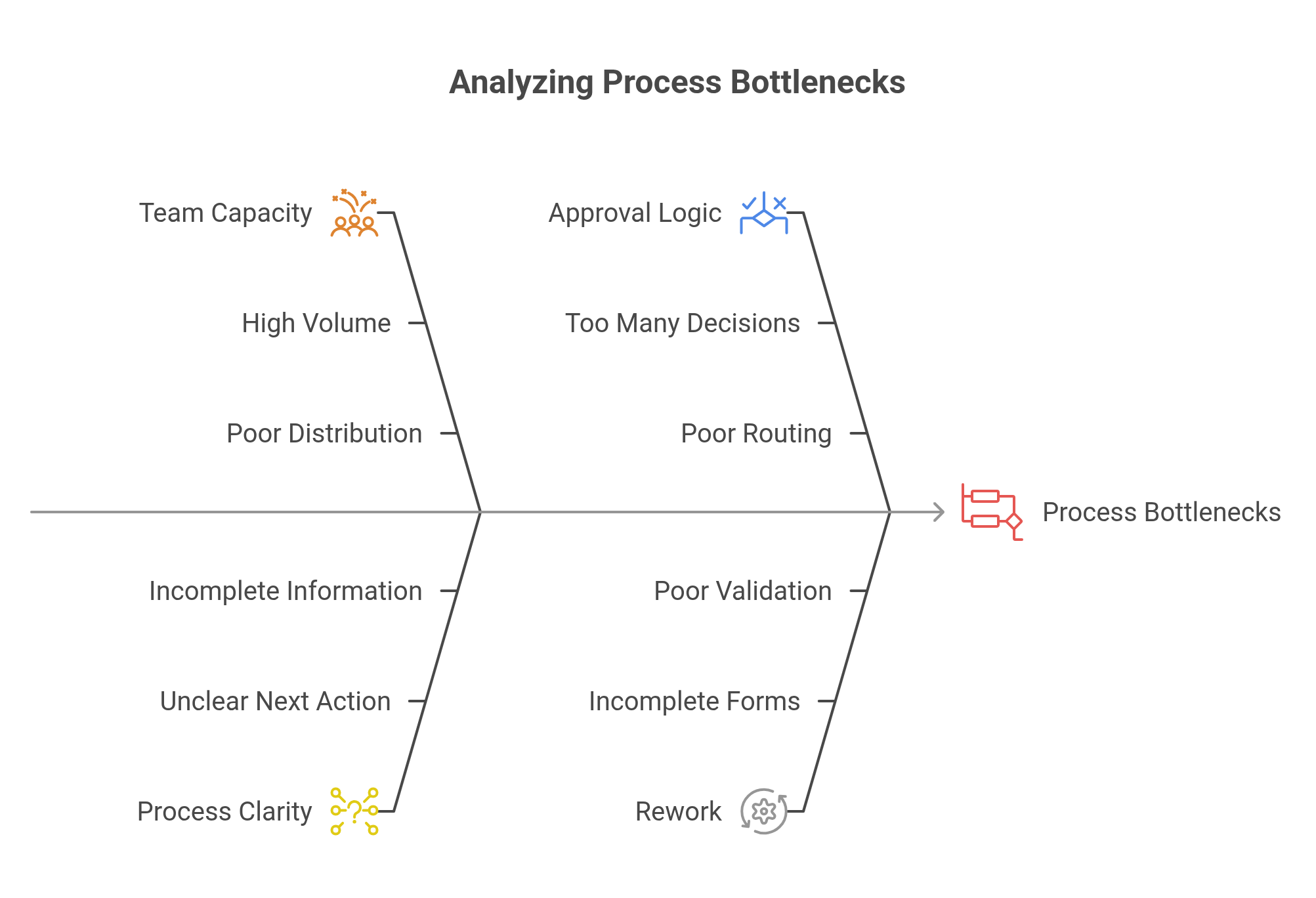
Bottlenecks are not always where they appear to be
The visible delay is not always the root cause.
An approval may appear to be the bottleneck, but the real problem may be that requests arrive incomplete. Finance may appear slow, but the previous step may be sending missing or inconsistent documents. A manager may appear to delay approvals, but may receive too many low-priority approvals with no clear routing rules.
A team may look overloaded, but the process may be creating unnecessary rework because rules are unclear. A final deadline may be missed, but the delay may have started several steps earlier.
The visible delay is often the symptom. The bottleneck is the point where the process first lost control.
This distinction matters because the wrong diagnosis leads to the wrong solution. Adding more people will not solve a bottleneck caused by unclear rules. Automating a broken handoff will not solve missing information. Escalating every approval will not solve poor routing logic.
Types of bottlenecks in business processes
1. Capacity bottlenecks
A capacity bottleneck happens when a person or team receives more work than they can process.
Example: All supplier registration requests must be reviewed by one analyst, even though volume has increased.
What to check:
- Number of open cases by person or team.
- Aging by step.
- Workload distribution.
- Throughput by responsible group.
- Whether work can be redistributed or classified by complexity.
2. Approval bottlenecks
An approval bottleneck happens when decisions wait too long for authorization.
Example: Every purchase request above a small threshold goes to a senior manager, even when many requests are low-risk and routine.
What to check:
- Average approval time.
- Approval backlog.
- Number of approvals per person.
- Approval rules by value, risk, department, or category.
- Whether escalation rules exist.
3. Handoff bottlenecks
A handoff bottleneck happens when work waits between teams because the next owner is unclear, the next team is not automatically notified, or the required information does not move with the case.
What to check:
- Who owns the next step after the handoff.
- How the next team knows the work is ready.
- Whether the required information is complete.
- Whether assignment is automatic or manual.
- How long the case waits between HR and IT.
For example, an employee onboarding process is often deeply interconnected with several other processes, departments, and teams.
In the BPMN diagram below, the main onboarding flow depends on multiple participants: Human Resources Management, Facility Management, Human Resources Services, Telecommunication, Service Desk Coordinator, Service Desk, and Recruitment and Hiring. Each area contributes a different part of the onboarding experience, such as hiring communication, document collection, workplace preparation, furniture readiness, telephone services, network access, email account configuration, IT credentials, and employee integration.
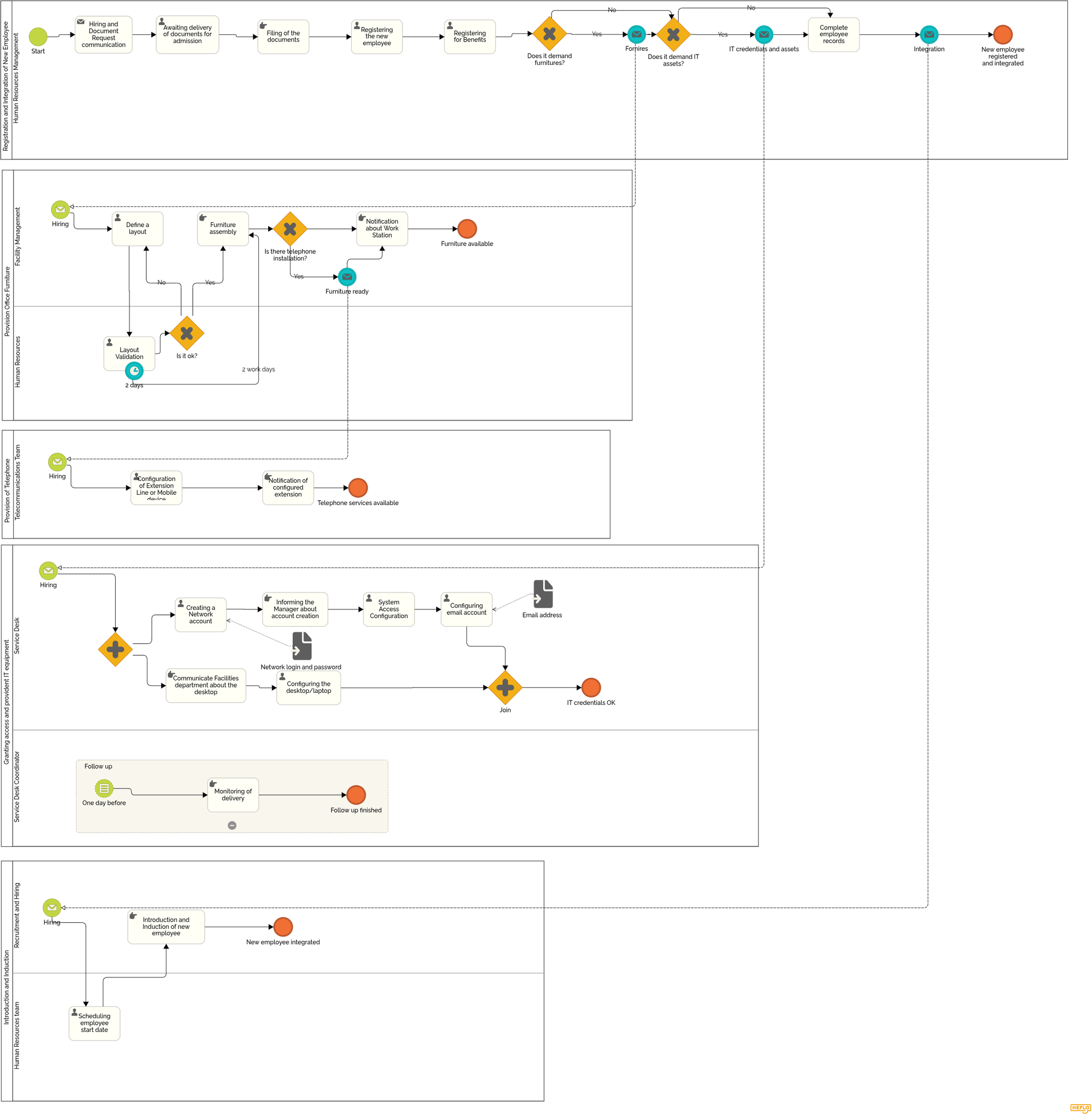
This is where handoff bottlenecks often appear. HR may have completed the hiring and documentation steps, but the process can still wait for workspace preparation, network credentials, equipment configuration, phone services, or confirmation from another team. If these handoffs are not clearly assigned, automatically triggered, and monitored with deadlines, onboarding may slow down even though no single task appears to be the obvious problem.
In BPMN, these risks become visible because the process crosses lanes and interacts with other pools. Each transition between participants shows a point where responsibility changes, information must be complete, and the next team must know exactly what to do.
4. Information bottlenecks
An information bottleneck happens when a task cannot move forward because data, documents, or context are missing.
Example: Finance cannot approve a reimbursement because the receipt, cost center, or manager justification is missing.
What to check:
- Required fields.
- Missing documents.
- Common clarification requests.
- Form quality.
- Validation rules before submission.
This type of bottleneck is common when requests start by email, chat, or spreadsheets. The request may reach the right team, but without the information needed to process it. As a result, the next step becomes a clarification loop instead of real progress.
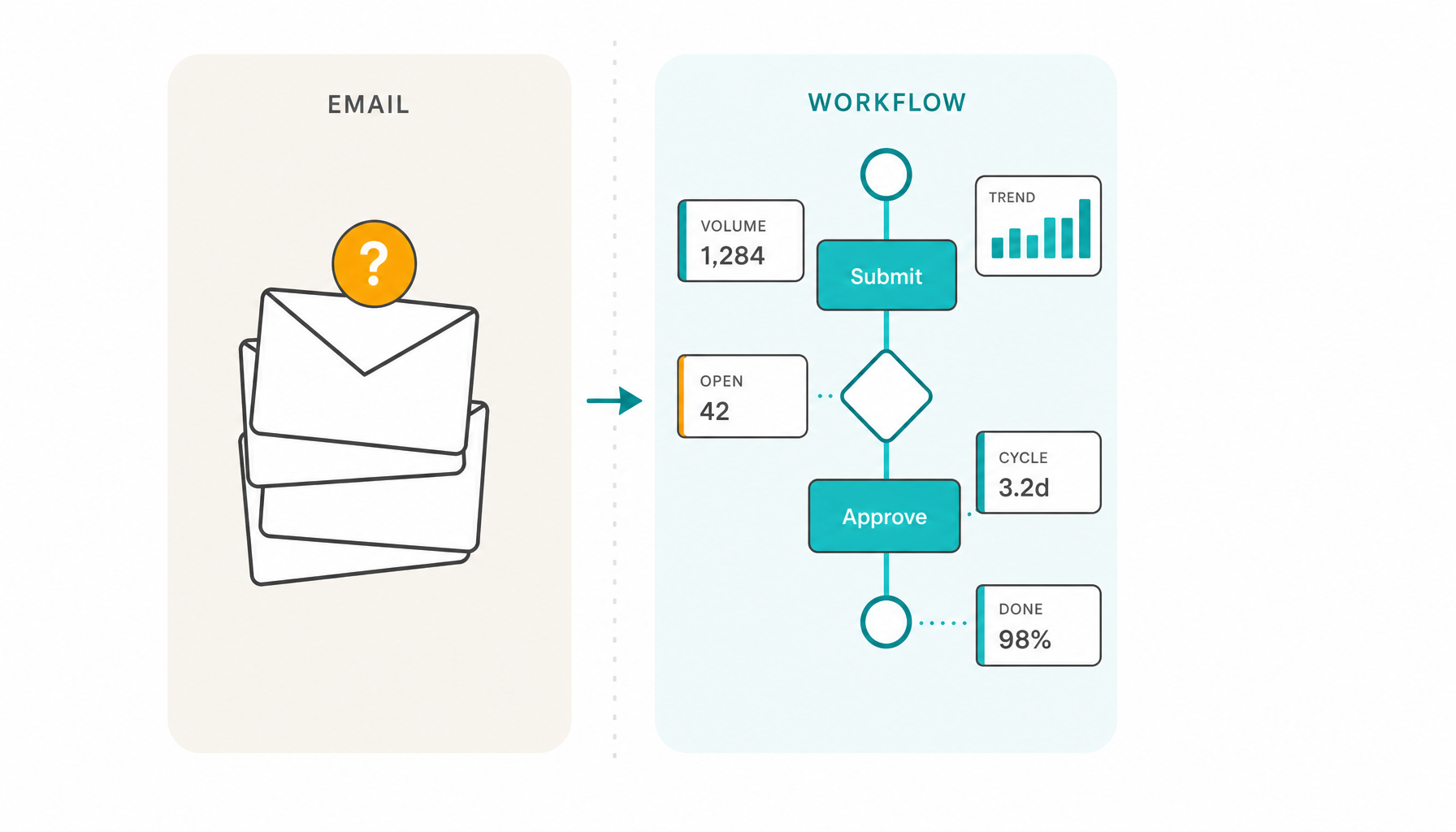
A structured workflow with forms helps reduce this risk by capturing required information before the case moves forward. Instead of discovering missing data after the task reaches Finance, HR, Procurement, IT, or Legal, the process can guide the requester to provide the right fields, documents, and context at the beginning.
5. Decision bottlenecks
A decision bottleneck happens when business rules are unclear and people need to ask what to do.
Example: A customer refund request depends on value, reason, customer segment, and contract terms, but the rule is not documented or embedded in the process.
What to check:
- Decision points.
- Rule clarity.
- Recurring questions.
- Cases routed manually.
- Decisions reversed later.
6. System bottlenecks
A system bottleneck happens when access, integrations, external systems, or manual data entry slow down execution.
Example: A team must copy information from email into an ERP, then update a spreadsheet and notify another department manually.
What to check:
- Manual data entry.
- Duplicate work.
- System access delays.
- Integration gaps.
- External system dependencies.
7. Exception bottlenecks
An exception bottleneck happens when non-standard cases consume too much time because there is no controlled path.
Example: A purchase request missing a required supplier document is handled differently depending on who receives it.
What to check:
- Exception frequency.
- Recurring exception types.
- Manual workarounds.
- Unclear responsibilities.
- Whether predictable exceptions have defined paths.
8. Deadline bottlenecks
A deadline bottleneck happens when intermediate delays silently consume the final process deadline.
Example: A request has a 10-day final deadline, but the first approval consumes seven days without anyone noticing the risk.
What to check:
- Overall process deadline.
- Step-level deadlines.
- Warning alerts.
- Overdue steps.
- Escalation rules.
- Deadline risk visibility.
📙 If missed deadlines are becoming visible to customers, explore how deadline control helps teams detect process delays before they become customer-facing problems.
9. Key person bottlenecks
A key person bottleneck happens when the process depends on a specific person’s knowledge, memory, or availability.
Example: Only one employee knows how to classify certain requests, handle exceptions, or decide which path a case should follow.
What to check:
- Informal knowledge.
- Manual routing decisions.
- Dependencies on specific people.
- Absence coverage.
- Whether rules are documented and embedded in the process.
📙 If this bottleneck depends too much on one person’s knowledge, availability, or memory, read our guide on how to reduce key person dependency in business processes.
How to identify bottlenecks step by step
Step 1: Map the process at a practical level
You do not need a perfect process model at the beginning. You need a practical view of how the work flows.
Start with:
- Start point.
- End point.
- Main steps.
- Handoffs.
- Decisions.
- Approvals.
- Exceptions.
The goal is not to create a beautiful diagram. The goal is to understand where work moves, waits, returns, or stops.
BPMN can be especially useful here because it helps represent tasks, gateways, events, approvals, responsibilities, and exception paths in a structured way.
🎓 If you are still building confidence with process modeling, you can also take our free BPMN modeling lesson to learn how to represent steps, decisions, handoffs, approvals, and exceptions in a structured way.
Step 2: Define what “stuck” means
Before identifying bottlenecks, define what counts as stuck.
For example, a case may be considered stuck when it is:
- Waiting more than a defined number of days.
- Waiting for approval.
- Waiting for documents.
- Overdue.
- Returned for correction.
- Missing a responsible person.
- Blocked by system access.
- Waiting for another department.
Without this definition, every team may interpret delay differently.
Step 3: Separate cycle time from waiting time
- Cycle time is the total time from the start to the end of the process.
- Task duration is the time spent actively doing the work.
- Waiting time is the time the case sits idle between actions.
Many bottlenecks are not caused by work time. They are caused by waiting time.
For example, an approval may take only five minutes to perform, but the request may wait four days before the approver opens it. Measuring only task duration would miss the real bottleneck.
Step 4: Look for queues
Queues show where work accumulates.
Ask:
- Which step has the most open cases?
- Which team has the largest backlog?
- Which cases stay longest in the same status?
- Which queue keeps growing over time?
- Which step blocks the next part of the process?
A queue is often the clearest operational sign of a bottleneck.
Step 5: Analyze rework
Rework can hide bottlenecks because the process appears to move, but work is actually looping back.
Ask:
- Where do cases return for correction?
- Which information is often missing?
- Which decisions are frequently reversed?
- Which forms or requests are incomplete?
- Which teams ask for clarification most often?
Reducing rework can improve flow without adding capacity.
Step 6: Check approval time
Approvals are frequent bottlenecks because they combine decision authority, priority, workload, and risk.
Ask:
- Which approval takes longest?
- Are approval rules clear?
- Are approvals routed to the right people?
- Are low-risk approvals consuming senior attention?
- Are escalations defined?
- Are approval deadlines visible?
Approval bottlenecks often require better rules, not only faster approvers.
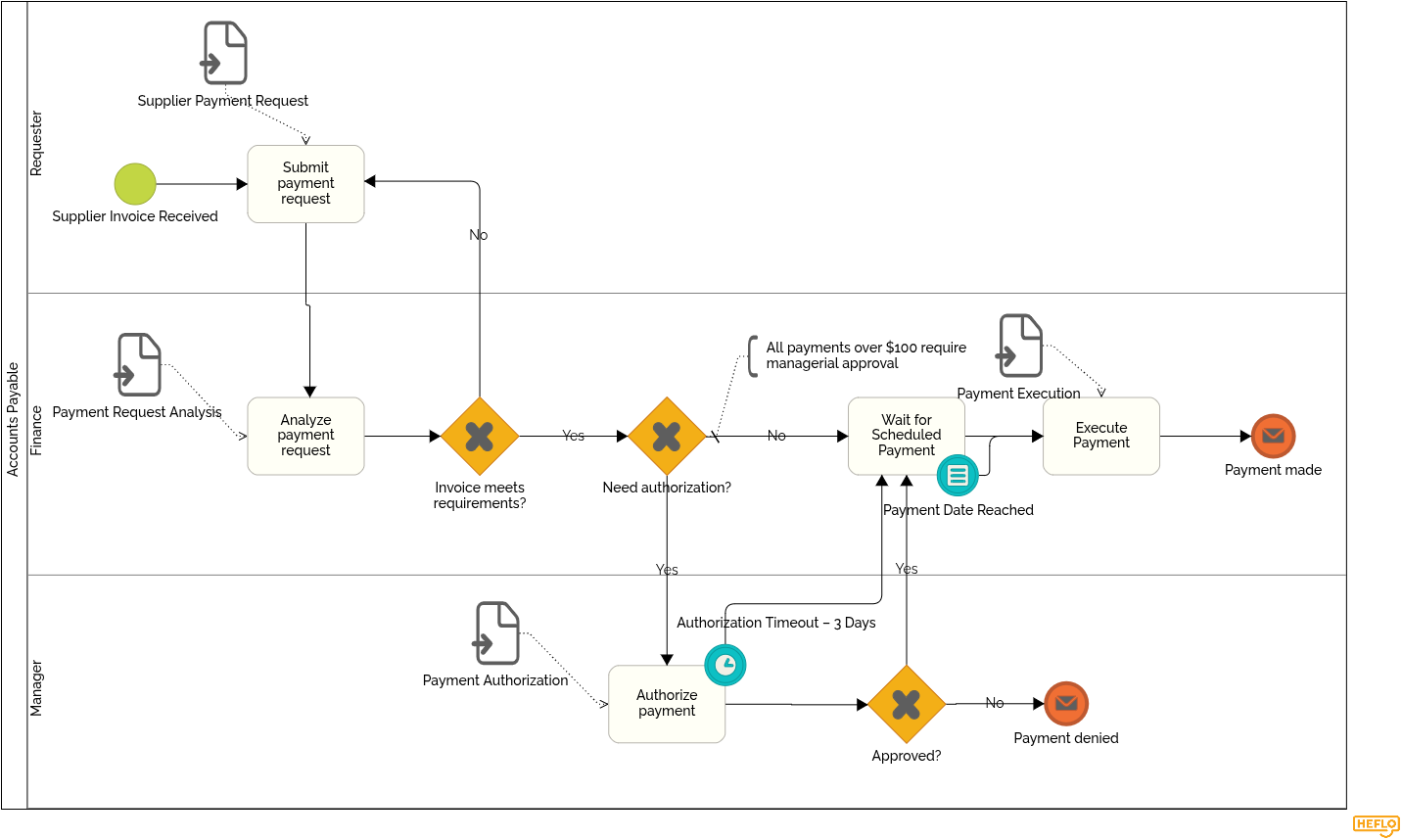
For example, in the accounts payable process below, a manager may need to authorize a payment before Finance can proceed. In the BPMN diagram, a timer is attached to the authorization task: if the manager does not respond within three days, the process follows a predefined path and moves forward to the scheduled payment step. This prevents the approval from becoming an invisible bottleneck and helps protect the overall payment deadline.
Step 7: Review handoffs
Delays often happen between teams, not inside a task.
Ask:
- Who owns the next step?
- How does the next team know work is ready?
- Is the handoff automatic or manual?
- Is information complete when the handoff happens?
- Is the next owner clearly assigned?
- Does the case wait in a shared inbox or spreadsheet?
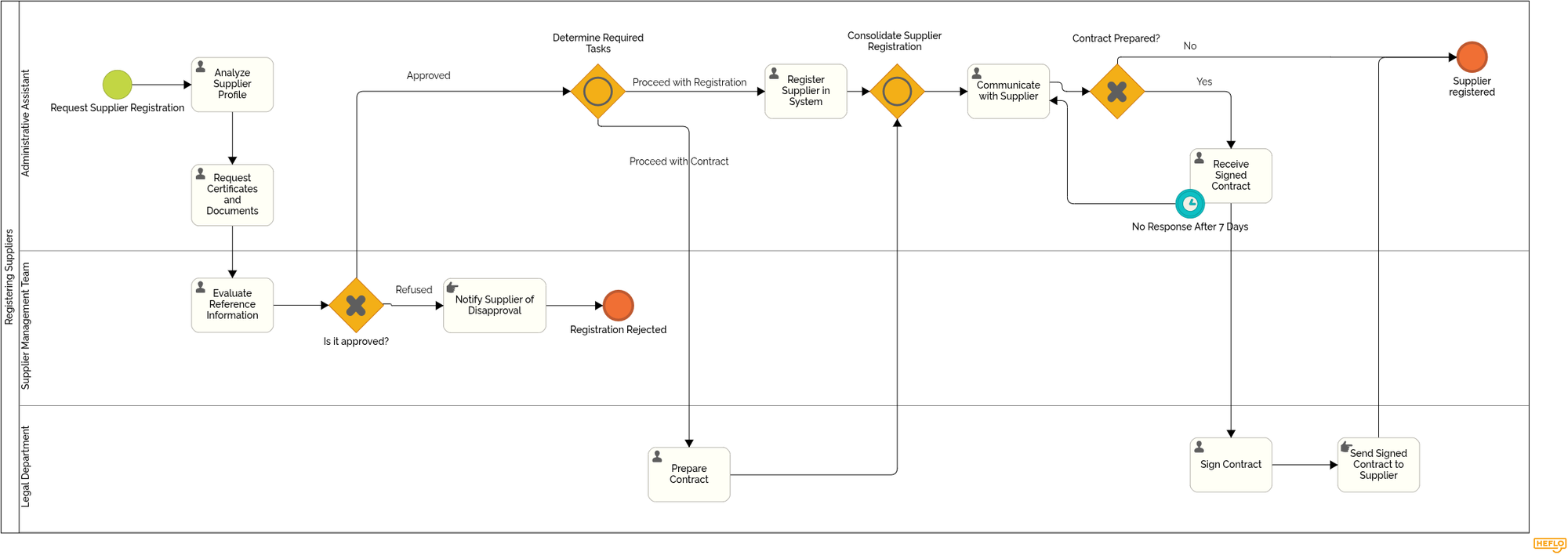
For example, in a supplier registration process, a handoff bottleneck may appear when the Supplier Management Team approves the supplier but the case must move to the Legal Department for contract preparation. In BPMN, this handoff is visible when the flow crosses from one lane to another. The analysis may already be complete, but the process can still wait if Legal is not automatically notified, if the contract request lacks required information, or if ownership of the next step is unclear.
📙 To explore this further, read our article on BPMN pools and lanes and see how they help represent responsibilities, handoffs, and interactions between process participants.
Step 8: Identify missing information
Missing data creates silent delays.
Ask:
- Which documents are often missing?
- Which fields are frequently corrected?
- Which tasks require clarification before they can start?
- Which requests are submitted without enough context?
- Which information should be mandatory earlier?
📚 Improving forms, validation rules, and submission requirements can remove bottlenecks before they reach downstream teams. To reduce delays caused by incomplete requests, read this HEFLO Knowledge Base article on how to configure form validation before the process moves forward.
Step 9: Separate standard flow from exceptions
Exceptions may be the real bottleneck.
Ask:
- Which cases follow the normal path?
- Which cases require special handling?
- Are exceptions predictable?
- Do exceptions have controlled paths?
- Are exception decisions documented?
- Are exception cases measured separately?
A process may work well for standard cases and fail repeatedly for exceptions. If exceptions are common, they should not be managed as surprises.
Step 10: Use execution data, not only opinions
Interviews and workshops help explain how people experience the process. But opinions alone are not enough.
Execution data shows where the process repeatedly loses time.
Look at actual cases, timestamps, status changes, approval times, rework loops, overdue steps, escalation history, and workload distribution.
Opinions explain how people experience the process. Execution data shows where the process repeatedly loses time.
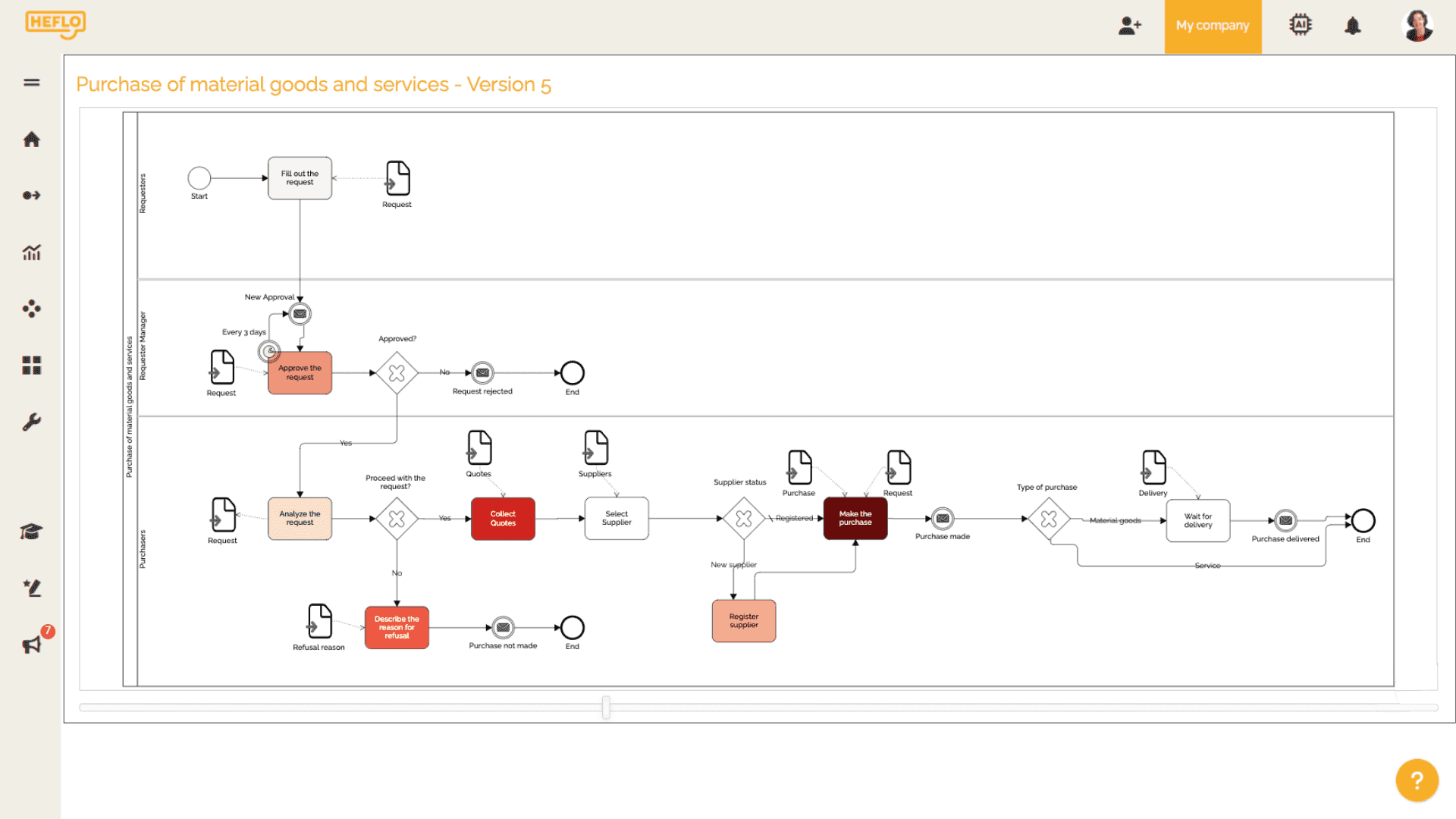
A process diagram can also become more useful when it is connected to execution data. In the example below, HEFLO highlights process activities with color intensity, helping teams quickly see which tasks are consuming more execution time and where bottlenecks may require further analysis.
Metrics that help reveal bottlenecks
Cycle time
Cycle time shows the total time required to complete the process from start to finish.
It helps reveal whether the process is improving overall, but it does not show where the delay happens by itself.
Waiting time
Waiting time shows how long cases sit idle between actions.
This is one of the most important metrics for bottleneck diagnosis because many delays happen while work is waiting, not while work is being performed.
Task duration
Task duration shows how long a specific task takes once someone starts working on it.
It helps distinguish between tasks that are genuinely time-consuming and tasks that mainly wait in a queue.
Number of open cases
Open cases show current work in progress.
A large number of open cases in one step may indicate a queue, capacity problem, or unclear ownership.
Cases by process step
This metric shows where cases are located in the process at a given moment.
It helps identify accumulation points.
Overdue cases
Overdue cases show where deadlines are being missed.
They are especially useful when analyzed by process step, responsible team, priority, or request type.
Approval time
Approval time shows how long decisions take.
It helps identify slow approval paths, overloaded approvers, unclear decision rules, or missing information before approval.
Rework rate
Rework rate shows how often cases return for correction.
A high rework rate usually points to unclear requirements, poor form design, incomplete information, or inconsistent rules.
Escalation count
Escalation count shows how often the process needs management intervention.
Frequent escalations may indicate poor deadline control, unrealistic expectations, or recurring exceptions.
Exception frequency
Exception frequency shows how often cases leave the standard path.
If exceptions are frequent, the standard process may not reflect operational reality.
Throughput
Throughput shows how many cases are completed in a period.
If workload increases but throughput does not, there may be a bottleneck limiting flow.
Aging by step
Aging by step shows how long cases have stayed in each step.
This is useful for identifying old cases before they miss the final deadline.
Workload by person or team
Workload distribution shows whether cases are concentrated in specific roles, people, or departments.
It helps reveal capacity bottlenecks and key person dependency.
A bottleneck becomes easier to manage when the process produces data about where work is waiting.
How deadlines reveal bottlenecks
A final deadline can show that a process was late. But it does not explain where the delay started.
Step-level deadlines show whether the final deadline is being protected or silently consumed.
For example, a process may have an overall deadline of 10 days. If the first task consumes six days and the second approval consumes three days, the final step may have only one day left. The last team may appear to be responsible for the delay, even though the deadline was already at risk before the case arrived.
Deadline control should include:
- Overall process deadlines.
- Task-level deadlines.
- Warning alerts.
- Critical alerts.
- Overdue alerts.
- Escalation rules.
- Deadline risk visibility.
- Management by exception.
Managers should not need to monitor every task manually. The process should alert them when a case deviates from the expected pattern.
This changes the management model. Instead of chasing every request, managers can focus on cases that are late, blocked, at risk, overloaded, or outside the normal flow.
How to reduce bottlenecks after identifying them
Not every bottleneck requires automation.
Some bottlenecks require simplifying the process. Others require clarifying rules, improving forms, redistributing capacity, defining responsibilities, or creating better exception paths.
Possible actions include:
- Removing unnecessary steps.
- Clarifying business rules.
- Defining responsibilities.
- Improving request forms.
- Reducing rework.
- Redistributing capacity.
- Creating step-level deadlines.
- Configuring alerts and escalations.
- Standardizing exception paths.
- Automating routing.
- Integrating systems.
- Improving process visibility.
The right solution depends on the cause of the bottleneck, not only on the symptom.
Different causes require different responses. Missing information may call for a better intake form. Approval overload may require redesigned routing rules. Manual follow-up can be reduced with alerts and structured workflow control. System duplication may justify integration. Unclear ownership should be solved by defining responsibilities before automating anything.
Automation can reduce bottlenecks when the process logic is understood. But automating a poorly understood process may only make delays move faster from one unclear step to another.
How HEFLO helps identify and reduce process bottlenecks
HEFLO helps teams move from “we think the process is slow” to “we can see where the process loses time.”
With HEFLO, organizations can model processes in BPMN and make handoffs, decisions, responsibilities, deadlines, approvals, and exception paths visible. The process model can then become an executable workflow, so work is not only documented but also coordinated through the process itself.
This allows teams to:
- Assign tasks automatically.
- Route work based on business rules.
- Control deadlines by process and by task.
- Configure alerts and escalations.
- Make process status visible.
- Trace who did what, when, and why.
- Generate execution data from real cases.
- Reveal where cases accumulate, wait, return, or become overdue.
- Support continuous improvement based on actual process behavior.
Process-driven execution creates the visibility and data needed to understand where work gets stuck.
HEFLO is not positioned as a generic task manager or checklist tool. It is designed for organizations that need structured process execution, operational visibility, deadline control, traceability, and continuous improvement based on how processes actually run.
FAQ
What is a bottleneck in a business process?
A bottleneck in a business process is a point where work accumulates, waits, returns for correction, depends on limited capacity, or stops moving forward.
It may be caused by people, approvals, handoffs, missing information, unclear rules, systems, deadlines, manual follow-up, or unmanaged exceptions.
How do I know where a business process is getting stuck?
Look for repeated signs such as long waiting time, growing backlogs, slow approvals, overdue cases, repeated corrections, manual follow-ups, unclear ownership, or frequent status requests.
A good diagnosis compares what people say about the process with how the process actually behaves in practice.
What is the difference between cycle time and waiting time?
Cycle time is the total time from the start to the end of a process.
Waiting time is the time a case sits idle between actions. Many bottlenecks are caused less by the work itself and more by the time work spends waiting for approval, information, assignment, or a decision.
Are bottlenecks always caused by overloaded people?
No. A person or team may appear to be the bottleneck, but the root cause may be unclear rules, missing information, poor handoffs, excessive approvals, lack of documentation, weak routing logic, or lack of visibility.
Fixing the system is often more effective than blaming the person.
Can one person become the bottleneck in a process?
Yes. A person becomes a bottleneck when the process depends on that person’s knowledge, judgment, memory, availability, or manual follow-up.
This often happens when rules are not documented, decisions are not structured, and tasks cannot move forward without one specific person’s context.
How do I reduce a bottleneck caused by one person?
Start by identifying which decisions, approvals, exceptions, or recurring tasks depend on that person.
Then document the rules, define responsibilities, create standard paths, configure deadlines, and decide which tasks can be delegated, automated, or routed to backup owners.
Should I hire someone to solve a bottleneck?
Hiring can help when the bottleneck is truly caused by lack of capacity.
But hiring alone does not solve unclear rules, undocumented work, poor handoffs, missing information, or weak process control. Before hiring, map the recurring work and clarify what can be delegated, standardized, automated, or supported by better process visibility.
Should I document a process before delegating it?
Yes. Delegation becomes risky when the task exists only in someone’s head.
A documented process makes it easier to transfer responsibility, train new people, reduce rework, and avoid bringing work back to the same person every time an exception appears.
How can approvals become process bottlenecks?
Approvals become bottlenecks when too many decisions depend on the same person, approval rules are unclear, requests arrive incomplete, backup approvers are missing, or low-risk approvals consume senior attention.
Approval paths should reflect risk, value, urgency, and responsibility.
How do handoffs create bottlenecks?
Handoffs create bottlenecks when work moves from one person or team to another without clear ownership, complete information, or automatic notification.
In BPMN, these risks often become visible when the flow crosses from one lane or pool to another.
How can deadlines help identify bottlenecks?
Final deadlines show whether the process was late. Step-level deadlines show where the delay started.
Warning alerts, critical alerts, overdue alerts, and escalation rules help managers act before a delay becomes visible to customers, suppliers, or internal stakeholders.
What metrics help identify bottlenecks?
Useful metrics include cycle time, waiting time, task duration, number of open cases, cases by step, overdue cases, approval time, rework rate, escalation count, exception frequency, throughput, aging by step, and workload by person or team.
These metrics help teams move from opinions about delays to evidence about where work is waiting.
Should I automate a process before identifying bottlenecks?
Usually no. Automating a poorly understood process may only make the same problems move faster.
First identify whether the bottleneck is caused by waiting time, missing information, unclear ownership, poor routing, rework, approval delays, manual follow-up, or lack of visibility.
How can workflow automation help reduce bottlenecks?
Workflow automation can help reduce bottlenecks by assigning tasks automatically, routing work based on rules, enforcing deadlines, sending alerts, escalating overdue cases, reducing manual follow-up, and generating execution data for continuous improvement.
Automation is most useful when the process logic is clear enough to be controlled, measured, and improved.