What Is SAP Fiori? A Practical Guide for Business and IT Teams

SAP Fiori is often described as SAP’s modern user experience. That definition is correct, but it does not fully explain why Fiori matters in real enterprise environments.
In practice, SAP Fiori changes how people access work inside SAP. Instead of relying only on transaction codes, dense screens, or complex menu paths, users can interact with role-based apps, tiles, pages, notifications, and guided interfaces organized around their responsibilities.
But Fiori is not only a visual redesign. It also involves architectural and governance decisions: the SAP Fiori Launchpad, roles and authorizations, backend services, app lifecycle management, performance, extensibility, and integration with the broader SAP landscape.
This is why SAP Fiori should be understood as more than a new interface. It connects user experience, enterprise applications, business processes, and IT architecture.
At the same time, Fiori is not a universal replacement for every older SAP interface. In many organizations, SAP Fiori and SAP GUI coexist. Some users benefit from a focused and guided experience, while others still depend on dense screens, advanced navigation, and high-volume transaction processing.
The practical question is not simply:
Should we use SAP Fiori?
A better question is:
Which users, tasks, and business scenarios are best supported by SAP Fiori?
This guide explains SAP Fiori from that practical perspective. It is written for business managers, process analysts, SAP consultants, IT teams, architects, and key users who need to understand what SAP Fiori is, what it is not, and how it fits into real enterprise work.
What Is SAP Fiori?
SAP Fiori is SAP’s modern user experience approach for enterprise applications. It defines how people interact with SAP systems through applications that are focused, consistent, and organized around user roles.
In practice, Fiori helps users reach the work they need to perform without starting from transaction codes or long navigation paths. A user typically enters through the SAP Fiori Launchpad and sees apps, pages, tiles, or actions relevant to their responsibilities.
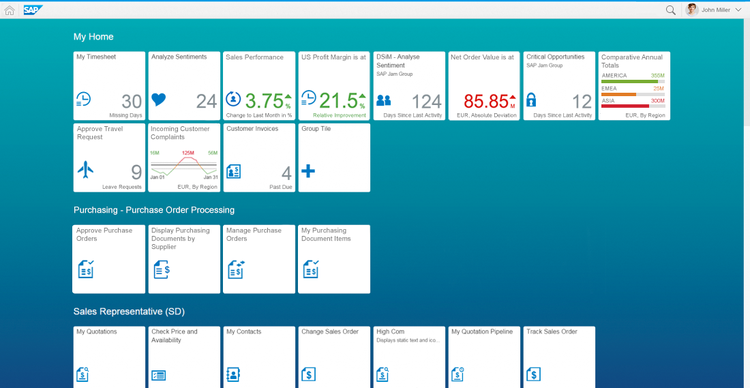
For example, a manager may see approval tasks, team information, or analytical cards. A buyer may work with purchase requisitions, supplier data, or order-related activities. A finance user may review invoices, financial reports, or exception items.
The goal is to make business work easier to access, understand, and complete.
SAP Fiori combines several ideas:
| SAP Fiori idea | What it means in practice |
|---|---|
| Role-based experience | Users see apps and information related to their responsibilities |
| Task-oriented design | Applications are organized around specific business activities |
| Consistent interaction | Similar patterns appear across different apps |
| Responsive interface | Apps can adapt to different devices and screen sizes |
| Guided access | Users are directed toward relevant actions and information |
This definition is a useful starting point, but it is not enough for real projects. To use SAP Fiori well, teams also need to understand how it differs from SAP GUI, SAPUI5, Fiori Elements, and the broader business process behind each app.
Is SAP Fiori a Product, a Design System, or a Set of Apps?
SAP Fiori can be confusing because the term is used in different ways.
At its core, SAP Fiori is SAP’s user experience approach and design system for enterprise applications. It defines principles, interaction patterns, layouts, controls, and guidelines for creating consistent SAP user experiences.
In daily SAP conversations, however, people often use “SAP Fiori” more broadly. Depending on the context, they may be referring to Fiori apps, the SAP Fiori Launchpad, Fiori Elements, SAPUI5 applications, or simply the experience of using SAP through a modern browser-based interface.
That is why it helps to separate the main terms.
| Term | Practical meaning |
|---|---|
| SAP Fiori | SAP’s modern user experience approach and design system |
| SAP Fiori apps | Applications designed according to SAP Fiori principles and patterns |
| SAP Fiori Launchpad | The central entry point where users access apps, tasks, pages, and business information |
| SAPUI5 | A development framework commonly used to build SAP Fiori applications |
| Fiori Elements | A template-based approach for building common SAP Fiori app patterns with less custom UI code |
| Freestyle UI5 | A flexible development approach for building custom SAPUI5 applications |
| Web GUI / HTML GUI | Browser-based access to traditional SAP GUI transactions, sometimes exposed through Launchpad tiles |
This distinction matters because many misunderstandings about SAP Fiori come from mixing these concepts.
When someone says “we use Fiori,” they may simply mean that users access SAP through the Fiori Launchpad. Inside that Launchpad, some tiles may open native SAP Fiori apps, while others may expose older SAP GUI transactions through a browser-based interface.
The same happens with “Fiori development.” Depending on the context, it may refer to SAPUI5, Fiori Elements, UI annotations, OData services, or custom application development. These topics are related, but they are not interchangeable.
In practice, SAP Fiori sits between user experience, application design, role configuration, backend services, authorizations, performance, and governance. A user may only see a tile or an app, but the quality of that experience depends on many decisions made behind the screen.
The most practical way to define it is this: SAP Fiori is primarily a user experience approach and design system, but in real projects the term often includes the apps, Launchpad, patterns, and technologies that deliver that experience to SAP users.
SAP Fiori vs SAP GUI: A Short Practical Comparison
SAP Fiori and SAP GUI are different ways of interacting with SAP, and they often coexist in the same organization.
SAP GUI is the traditional interface many experienced SAP users know well. It can be highly efficient for dense, repetitive, expert work where users need speed, broad navigation, many fields, keyboard-driven interaction, and advanced transaction control.
SAP Fiori is designed around role-based apps and focused tasks. It often works better for users who need guided access to specific activities, such as approvals, self-service requests, mobile work, analytical overviews, or occasional business tasks.
The difference is not simply old versus new. The better fit depends on the work being done.
| Scenario | Often better fit |
|---|---|
| Occasional employee self-service | SAP Fiori |
| Manager approvals | SAP Fiori |
| Mobile or field work | SAP Fiori |
| Analytical overviews | SAP Fiori or analytics tools |
| High-volume expert processing | SAP GUI may still fit better |
| Deep technical administration | SAP GUI or specialized tools |
| Legacy transactions with many fields | SAP GUI or a redesigned custom app |
A common mistake is assuming that every SAP GUI transaction should be replaced by a Fiori app one-to-one. In practice, some activities can be redesigned into simpler role-based apps, while others still require the density and flexibility of the traditional interface.
That is why SAP Fiori adoption should start with the work itself, not with the assumption that one interface is always superior. For each scenario, teams should ask whether users need a guided experience, a compact expert screen, mobile access, analytical visibility, high-volume processing, or a redesigned process flow.
The best SAP environments use both approaches intentionally. Fiori improves access to focused tasks and role-based experiences, while SAP GUI can remain useful where expert users need speed, density, and control.
Why SAP Fiori Matters in S/4HANA Environments
SAP Fiori is especially important in S/4HANA environments because it reflects a broader shift in how SAP expects users to access work, information, and business applications.
In traditional SAP environments, many users relied heavily on transaction codes, menu paths, and dense expert screens. With S/4HANA, the user experience increasingly moves toward role-based access through the SAP Fiori Launchpad, where users can find applications, pages, tasks, notifications, analytical views, and business actions related to their responsibilities.
This shift changes the way organizations plan SAP adoption. Fiori is not just something added at the end of an implementation to make SAP look more modern. It influences how users are onboarded, how work is presented, how applications are discovered, and how daily activities are organized across the SAP landscape.
That is why S/4HANA projects should treat SAP Fiori as part of the operating model, not only as a presentation layer. The question is not only which apps should be activated, but how the organization wants people to access, understand, and perform work in SAP.
SAP Fiori and Business Processes: Approval Task vs Approval Process
A simple approval scenario shows why SAP Fiori should be understood in the context of the larger business process.
Imagine a manager opens the SAP Fiori Launchpad and sees a pending purchase request approval. The app shows the requester, supplier, amount, cost center, justification, attached documents, and available actions. From the user’s perspective, the task is clear: review the information and approve or reject the request.
But the approval screen is only one part of the work.
Before that task appears, someone may have created the request, entered mandatory data, selected the cost center, attached documents, checked supplier information, and triggered the correct approval path. After the manager makes a decision, the process may continue to purchasing, finance, supplier communication, document generation, rework, or exception handling.
The app may answer the immediate question:
What should I approve now?
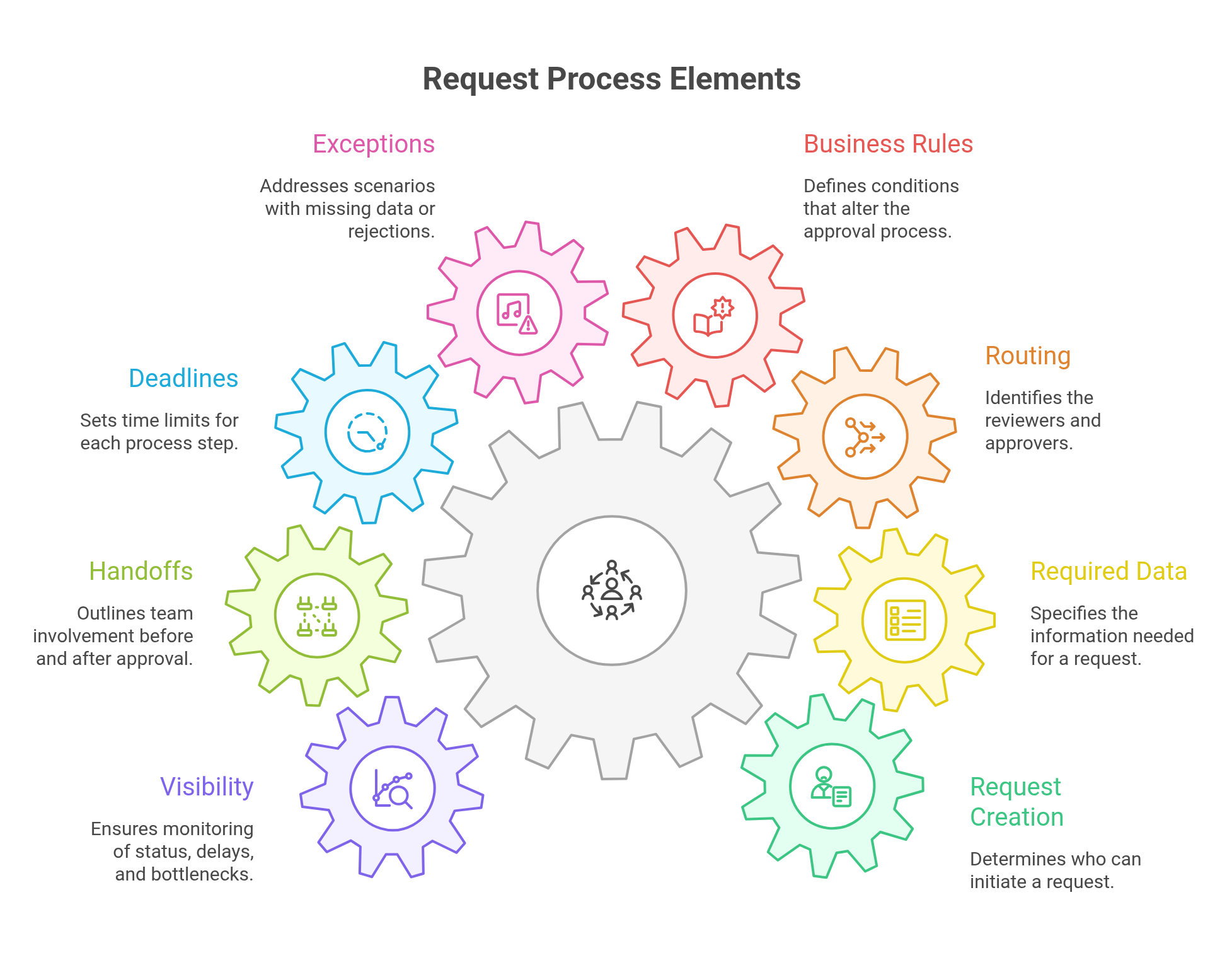
But the process needs to answer broader questions:
- Who can create the request?
- What data is required before approval?
- How is the approval path determined?
- What happens if the request is rejected?
- What happens if approval is late?
- Who can monitor the process beyond the individual task?
This distinction matters because the quality of the user experience depends on the process logic behind it: rules, responsibilities, exceptions, deadlines, handoffs, and monitoring.
The same logic applies to many other scenarios: HR requests, finance reviews, service requests, procurement tasks, master data changes, and shared services workflows.
A strong SAP Fiori experience starts with the screen the user sees, but it succeeds when that screen fits the process the business actually runs.
What Makes SAP Fiori Work in Real Enterprise Environments?
A successful SAP Fiori initiative depends on more than activating apps or publishing tiles in the Launchpad. The experience users see on the screen is only the visible layer of a broader set of design, governance, and technical decisions.
First, roles need to be well defined. Users should see the apps, pages, and information that are relevant to their responsibilities, without being overwhelmed by unnecessary options or blocked by missing authorizations.
Second, the Launchpad needs governance. Spaces, pages, catalogs, groups, and tiles can become difficult to manage if there is no clear ownership over how they are organized, named, reviewed, and maintained over time.
Third, backend services need to be reliable. A clean interface will not create a good experience if the underlying services are slow, incomplete, unstable, or difficult to support. Performance is especially important because slow apps quickly reduce user trust and adoption.
Fourth, teams need a clear extensibility strategy. Some needs can be met with standard SAP Fiori apps. Others may require configuration, Fiori Elements, freestyle SAPUI5 development, side-by-side extensions, or integration with other platforms. The important point is to avoid treating every requirement as either a simple activation or a full custom development project.
Finally, SAP Fiori works better when business and IT teams share ownership of the experience. Business teams understand the work, decisions, exceptions, and user journeys. IT teams ensure that the architecture, security, performance, lifecycle, and integration model are sustainable.
In real enterprise environments, SAP Fiori succeeds when user experience, process understanding, technical architecture, and governance are treated as connected parts of the same initiative.
Final Thoughts
When an organization takes SAP Fiori seriously, it changes more than the look of SAP. It changes how work is presented, how users discover what they need to do, how roles are translated into digital experiences, and how daily interaction with SAP becomes easier or harder in practice.
The best approach is to treat Fiori as both an experience and architecture decision. Each scenario should be evaluated according to the work being performed, the people involved, and the technical foundation required to support it. When business and IT make those decisions together, SAP Fiori becomes a practical way to improve how SAP is used across the enterprise.
FAQ
What is SAP Fiori in simple terms?
SAP Fiori is SAP’s modern user experience approach for enterprise applications. It helps users access SAP tasks, information, reports, approvals, and actions through role-based and task-oriented apps.
Is SAP Fiori a product or a design system?
SAP Fiori is primarily a user experience approach and design system. In practice, people also use the term to refer to SAP Fiori apps, the SAP Fiori Launchpad, design patterns, and the broader experience of using modern SAP applications.
Is SAP Fiori the same as SAPUI5?
No. SAP Fiori describes the user experience, design principles, and application patterns. SAPUI5 is a development framework commonly used to build SAP Fiori applications.
What is the difference between SAP Fiori and SAP Fiori Client?
SAP Fiori is the user experience approach. SAP Fiori Client was a mobile client used to access Fiori apps. They are not the same thing, and discussions about SAP Fiori Client do not mean that SAP Fiori itself is being discontinued.
Is SAP Fiori being discontinued?
No. SAP Fiori as SAP’s modern user experience approach is not being discontinued. A common confusion comes from discussions about SAP Fiori Client, which was a mobile client used to access Fiori apps. SAP Fiori Client and SAP Fiori are not the same thing.
Is SAP Fiori replacing SAP GUI?
Not in every scenario. Many organizations use SAP Fiori and SAP GUI together. SAP Fiori often works well for role-based, guided, mobile, analytical, and self-service tasks, while SAP GUI may still fit better for dense, repetitive, expert, or high-volume work.
Why do some users still prefer SAP GUI?
Some users prefer SAP GUI because it can be more efficient for dense, repetitive, high-volume, or expert work. SAP Fiori often works better for focused, role-based, mobile, analytical, guided, or self-service scenarios. The best choice depends on the user, task, data density, frequency, and process context.
Can SAP GUI transactions appear in SAP Fiori Launchpad?
Yes. A Launchpad tile may open a native SAP Fiori app, but it may also open a traditional SAP GUI transaction through a browser-based interface such as Web GUI or HTML GUI. A tile does not automatically mean the app is a native Fiori app.
Why can SAP Fiori feel slow or frustrating?
SAP Fiori can feel frustrating when apps are not well aligned with real work, when Launchpad roles are confusing, when users cannot find the apps they need, when performance is poor, or when a simplified app does not cover the functional depth users had in SAP GUI.
Why does SAP Fiori matter for business users?
SAP Fiori affects how users complete daily work in SAP. It can make tasks such as approvals, self-service, reporting, and exception handling easier to access when the apps are aligned with real roles and responsibilities.
Why does SAP Fiori matter for IT teams?
SAP Fiori involves more than interface design. It depends on roles, authorizations, Launchpad governance, backend services, performance, extensibility, support, and long-term maintainability.
What is the difference between a SAP Fiori app and a business process?
A SAP Fiori app usually supports a specific task or interaction. A business process includes the larger flow around that task, including roles, data, rules, decisions, deadlines, exceptions, handoffs, and visibility.
When should SAP Fiori be used?
SAP Fiori is a strong fit when users need focused, role-based, guided, mobile, analytical, or self-service experiences. The best fit depends on the user profile, task frequency, data needs, device, and business process context.