SAP Fiori vs HTML GUI: Why Not Every Tile Is a Native Fiori App

It happens in almost every S/4HANA project. A user logs into the SAP Fiori Launchpad, sees a clean grid of tiles, clicks one — and lands on a screen that looks suspiciously like the SAP GUI transaction they have used for fifteen years, just running in a browser tab. The natural question follows: "Wait, is this Fiori?"
The honest answer is: not necessarily. The SAP Fiori Launchpad is an entry point, not a technology guarantee. Behind those uniform tiles can sit very different applications: native SAP Fiori apps built with SAPUI5 or Fiori Elements, freestyle SAPUI5 developments, Web Dynpro ABAP applications, analytical pages — or classic SAP GUI transactions rendered in the browser via SAP GUI for HTML (also called Web GUI or HTML GUI).
This distinction is not academic. It affects what users can realistically expect in terms of experience, mobile access, performance, and training. It also affects how project teams measure modernization progress. This article explains the difference, when HTML GUI tiles make sense, where they create confusion, and how to tell what a tile actually opens before you build a rollout plan around it.
What Is a Native SAP Fiori App?
A native SAP Fiori app is an application designed and built according to the SAP Fiori design system — SAP's set of principles for role-based, task-oriented, coherent user experiences.
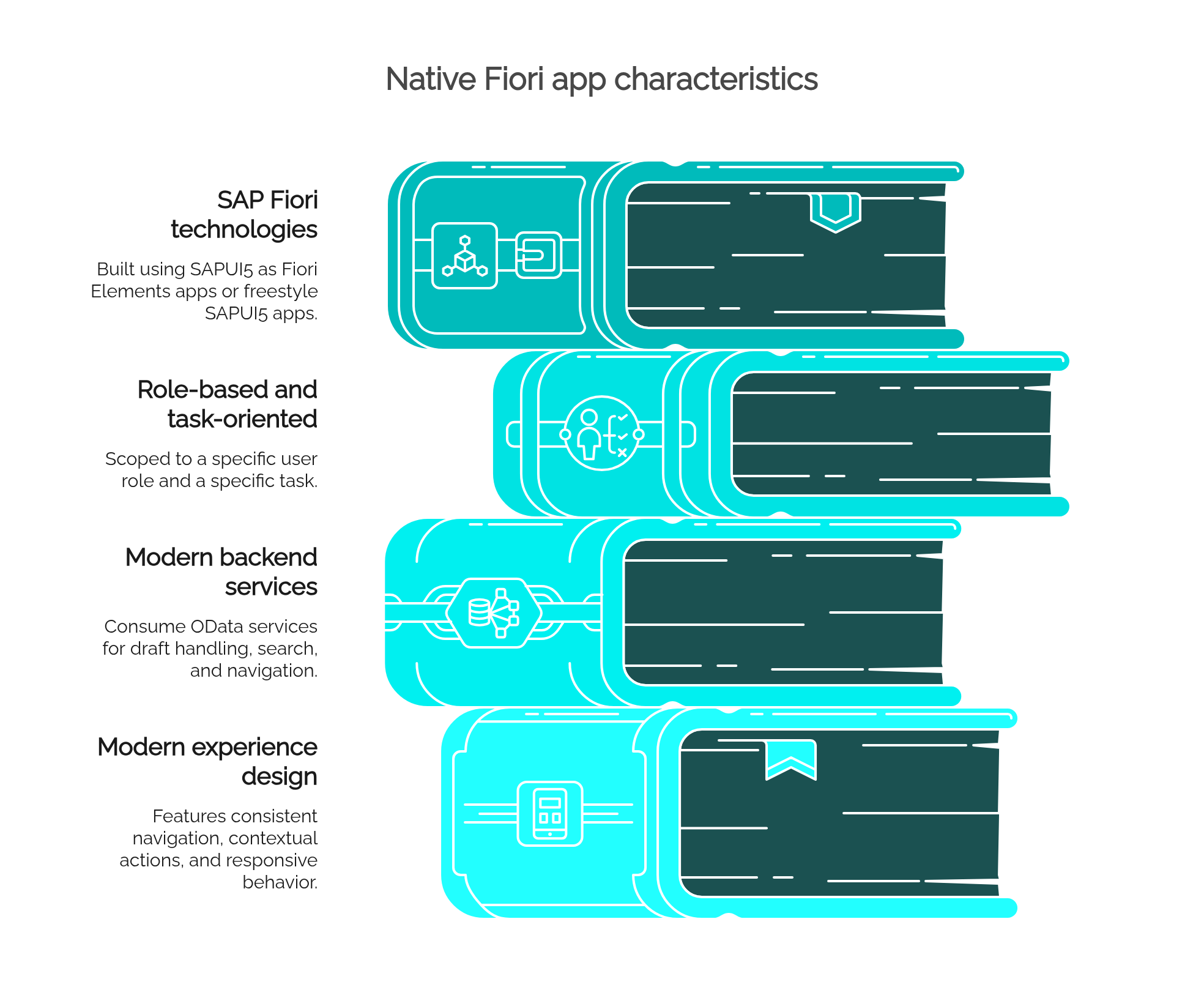
In practical terms, a native Fiori app typically has these characteristics:
- Built with SAP Fiori technologies. Most native apps use SAPUI5, either as Fiori Elements apps (generated from annotated OData services using standard floorplans like List Report or Object Page) or as freestyle SAPUI5 apps developed for more specific interaction patterns.
- Role-based and task-oriented. Instead of one giant transaction covering dozens of scenarios, a Fiori app is scoped to a specific user role and a specific task — approving a purchase order, checking a supplier's status, posting a simple document.
- Connected to modern backend services. Native apps usually consume OData services, which enables features like draft handling, search, and structured navigation between related objects.
- Designed for a modern experience. That means consistent navigation, contextual actions, and — depending on the app — responsive behavior that adapts to different screen sizes.
A useful mental model: a native Fiori app was designed as a Fiori app from the start. It was not converted, wrapped, or rendered into one.
What Is SAP GUI for HTML (Web GUI / HTML GUI)?
SAP GUI for HTML is a technology that renders classic SAP GUI transactions in a web browser. Instead of installing SAP GUI for Windows on a workstation, the SAP Internet Transaction Server (ITS) generation inside the ABAP stack translates the classic Dynpro screens into HTML, and the user interacts with the transaction through the browser.
The important points:
- The underlying application is still the classic transaction. When a tile launches ME23N or VA03 through SAP GUI for HTML, the business logic, screen sequence, and field structure are those of the original Dynpro transaction.
- The browser is only the presentation layer. The screens are converted to HTML on the fly, which is why they retain the classic look — menu bars, function keys, screen-based navigation — with some visual theming applied to soften the appearance.
- These transactions can be launched from the Fiori Launchpad through tiles and target mappings, exactly like native apps. This is what makes them easy to confuse.
- The practical benefit is real: users get access to transactions without a local SAP GUI installation, and administrators get centralized, browser-based access to functionality that has no Fiori equivalent yet.
Rendering in a browser does not change the nature of the application. An HTML GUI tile is classic SAP GUI delivered through a different channel — not a redesigned experience.
Why Tiles Can Be Misleading
The Fiori Launchpad deliberately presents a unified surface. Every tile looks similar: a title, maybe a KPI number, a consistent visual style. That consistency is good for navigation, but it hides the technical diversity underneath.
A single Launchpad can contain tiles that open, among others:
- A native SAP Fiori app (for example, a Fiori Elements List Report for managing sales orders)
- A freestyle SAPUI5 app built for a custom scenario
- A classic SAP GUI transaction rendered through Web GUI
- A Web Dynpro ABAP application, common for many HR and finance scenarios
- A custom or third-party web application embedded via URL
- An analytical page or report, such as a Smart Business KPI drill-down
To the user, all of these are "tiles in Fiori." To the project team, they represent different technologies with different capabilities, limitations, and lifecycles. Treating them as interchangeable is where expectation problems begin — a user who had a great experience with a Fiori Elements approval app will click the next tile expecting the same, and may instead get a dense classic transaction with function-key navigation.
SAP Fiori vs HTML GUI: Practical Comparison
| Criteria | Native SAP Fiori App | HTML GUI / Web GUI Tile |
|---|---|---|
| Underlying technology | SAPUI5 / Fiori Elements, OData services | Classic Dynpro transaction rendered as HTML via ITS |
| User experience | Task-oriented, guided, consistent with Fiori design | Classic SAP GUI screens in a browser; transaction-oriented |
| Mobile readiness | Often responsive or adaptive (varies by app) | Generally poor on mobile; screens not designed for touch or small displays |
| Functionality coverage | Scoped to specific tasks; may not cover every edge case of the old transaction | Full depth of the original transaction, including expert features |
| Consistency with Fiori design principles | High by design | Low; visual theming does not change interaction patterns |
| Performance expectations | Depends on OData service design; typically fast for scoped tasks | Depends on ITS rendering and transaction complexity; screen-by-screen round trips |
| Training impact | New interaction patterns; simpler per task, but requires onboarding | Familiar to experienced users; steep for new users unfamiliar with SAP GUI conventions |
| Best use case | High-frequency tasks, casual users, approvals, mobile scenarios | Expert transactions, gap coverage, transition phases |
| Modernization value | Represents genuine UX and often process redesign | Preserves access; does not modernize the experience or process |
The comparison is not "good vs bad." It is "redesigned experience vs preserved access." Both have a place — but they should be labeled honestly.
Why Organizations Use HTML GUI Tiles
There are solid, defensible reasons why HTML GUI tiles appear in real Launchpads:
- Coverage gaps. Not every SAP GUI transaction has a native Fiori equivalent. Even in current S/4HANA releases, some functional areas are still served primarily by classic transactions.
- Functional depth. Some Fiori apps deliberately cover the common 80% of a scenario. Power users who need the remaining 20% — special stock views, obscure document types, mass-change functions — may still need the full transaction.
- Gradual migration. S/4HANA adoption is rarely a big bang for the user experience. Companies often move roles to Fiori incrementally, and HTML GUI keeps everything reachable from one place in the meantime.
- A single entry point. Putting classic transactions behind Launchpad tiles gives users one URL, one catalog structure, and one authorization concept — instead of maintaining SAP GUI access in parallel for a subset of users.
- Controlled project scope. Rebuilding a rarely used transaction as a custom SAPUI5 app costs real development and maintenance effort. If the transaction works and is used by five specialists a month, wrapping it is often the rational choice.
Used consciously, HTML GUI tiles are a legitimate architectural decision, not a shortcut to be ashamed of.
The Risks of Calling Everything "Fiori"
Problems arise not from HTML GUI itself, but from mislabeling it. When everything on the Launchpad is communicated as "our new Fiori experience," several risks compound:
- Broken user expectations. Users promised a modern experience click a tile and get a classic transaction. The disappointment attaches to the entire program, including the genuinely good native apps.
- Unrealistic mobile plans. Leadership may assume that "everything is in Fiori now, so everything works on tablets." HTML GUI screens on a phone are, at best, usable in emergencies.
- Confusing training material. If training treats all tiles the same, it will either over-explain simple Fiori apps or under-explain complex classic transactions. Trainers need to know which is which.
- Inflated modernization metrics. "We have 300 tiles live" sounds like progress. If 220 of them are Web GUI wrappers, the actual UX modernization is far smaller than the number suggests — and roadmap decisions built on that number will be wrong.
- Skipped process redesign. Wrapping a transaction preserves the old process exactly as it was. Teams may miss the opportunity — and sometimes the need — to rethink the process that a native app redesign would have forced.
- Misrouted support tickets. A rendering issue in ITS, a performance problem in an OData service, and a Dynpro screen error have different root causes and different owners. If the support team cannot tell app types apart, triage slows down.
Why HTML GUI Is Not Always Bad
It is worth stating the balanced view explicitly, because HTML GUI often gets dismissed unfairly in modernization discussions:
- For power users, the full transaction is frequently better than a simplified app. An experienced MM specialist working in ME21N all day loses productivity in a scoped-down interface.
- It preserves proven functionality with zero redevelopment risk. The transaction behaves exactly as validated over years of use.
- It reduces disruption during transition. Users keep familiar workflows while the organization builds Fiori capability where it matters most.
- It handles the long tail of transactions — the hundreds of rarely used but occasionally essential functions that will never justify a rebuild.
- It supports access centralization: one Launchpad, one authentication flow, no local GUI installations to manage for casual users.
The one thing it does not do is deliver a native Fiori user experience — and that is fine, as long as nobody claims otherwise.
How to Identify What Type of App a Tile Opens
For anyone evaluating an existing Launchpad or planning a rollout, these checks reveal what is actually behind a tile:
- Check the SAP Fiori Apps Reference Library. Search for the app by name or ID. The library lists the application type explicitly — SAP Fiori (SAPUI5), Web Dynpro, or SAP GUI. It also shows required backend components and available releases.
- Look at the application type in the technical details. In the Launchpad content configuration (target mappings, or launchpad content in newer tooling), each target specifies whether it launches an SAPUI5 component, a Web Dynpro application, or a transaction via SAP GUI for HTML.
- Review the target mapping and semantic object/action. The intent behind the tile points to the concrete launch configuration, which names the technology.
- Inspect the URL at runtime. SAPUI5 apps typically load a component within the Launchpad shell; Web GUI sessions show characteristic ITS URL patterns (such as paths containing
/sap/bc/gui/sap/its/webgui). - Apply the design test. Does the screen follow Fiori patterns — object pages, list reports, footer action bars? Or does it show classic menu bars, OK-code fields, and function-key hints?
- Test on desktop and mobile. A native, responsive app adapts. A Web GUI screen on a phone makes the difference obvious within seconds.
- Validate against the role and process. Regardless of technology, confirm the app actually supports the tasks the target role performs — a native Fiori app that covers only part of the process may still need a classic transaction alongside it.
What SAP Teams Should Document
Most Launchpad confusion is preventable with a simple internal app catalog. For every tile in scope, record:
- Tile name and catalog/space assignment
- Business role that uses it
- Process supported (linked to your process documentation)
- App type — Fiori Elements, freestyle SAPUI5, Web Dynpro, SAP GUI for HTML, external URL
- Classification: native Fiori or HTML GUI wrapper
- Related SAP GUI transaction (for wrapped or partially replaced transactions)
- Owner — functional and technical
- Mobile support — tested, not assumed
- Known limitations compared to the classic transaction or expected scope
- Training notes — what users need to learn, what changes from before
- Replacement roadmap, if the tile is a transitional wrapper scheduled for a native successor
This catalog becomes the shared reference for training teams, support, testing, and roadmap planning — and it makes modernization progress measurable instead of anecdotal.
Implications for SAP Fiori Rollouts
Knowing which tiles are native and which are wrappers changes how you run the rollout itself:
- User adoption: Communicate honestly. Position native apps as the new experience and HTML GUI tiles as convenient browser access to familiar transactions. Users forgive a classic screen; they do not forgive being told it is something it isn't.
- Training: Split materials by app type. Native apps need onboarding to new interaction patterns; Web GUI tiles need, at most, a note that the familiar transaction now opens in the browser.
- Role design: Catalogs and spaces should reflect what a role actually needs — which often means a deliberate mix of native apps for frequent tasks and wrapped transactions for expert work.
- Process documentation: Where a native app replaced a transaction, the documented process steps usually change. Where a wrapper is used, they usually don't. Document accordingly.
- Testing: Native apps require OData service and UI testing; Web GUI tiles require transaction testing plus browser rendering checks. Different test plans, different defects.
- Performance expectations: Set them per app type. Screen-by-screen round trips in Web GUI behave differently from OData-backed Fiori apps, especially over VPN or high-latency connections.
- Change management: Sequence communication around the genuinely new experiences. A launch announcement built on wrapped transactions overpromises and undermines credibility for later waves.
- Modernization roadmap: Use the app catalog to track real conversion — how many high-frequency tasks moved to native apps — rather than counting tiles.
Final Answer
A tile in the SAP Fiori Launchpad is only an access point. It does not guarantee that the application behind it is a native SAP Fiori app. Native Fiori apps, Fiori Elements apps, freestyle SAPUI5 apps, Web Dynpro applications, and classic SAP GUI transactions rendered through SAP GUI for HTML can all sit behind visually identical tiles.
That is not a flaw in the Launchpad — it is how a transition-friendly platform is supposed to work. The problem starts only when teams stop distinguishing between the two. Before making decisions about adoption, training, mobile use, performance, or modernization progress, identify what each tile actually opens. The technology behind the tile — not the tile itself — determines what users will experience.
FAQ
Is every SAP Fiori Launchpad tile a native Fiori app?
No. The Fiori Launchpad can launch native SAPUI5/Fiori Elements apps, Web Dynpro applications, classic SAP GUI transactions via SAP GUI for HTML, and even external web applications. The tile is only the entry point; the technology behind it varies.
What is the difference between SAP Fiori and SAP GUI for HTML?
SAP Fiori apps are applications designed and built according to SAP Fiori design principles, typically with SAPUI5 or Fiori Elements and OData services. SAP GUI for HTML renders existing classic SAP GUI transactions in a browser without changing their design, logic, or interaction patterns.
Is HTML GUI the same as Web GUI?
Yes. "HTML GUI," "Web GUI," and "SAP GUI for HTML" all refer to the same technology: browser-based rendering of classic SAP GUI transactions through the Internet Transaction Server (ITS) integrated in the ABAP stack.
Can SAP GUI transactions be launched from the Fiori Launchpad?
Yes. Through target mappings, classic transactions can be launched as tiles and open in the browser via SAP GUI for HTML. This is a common and supported configuration, especially during S/4HANA transitions.
Why do some Fiori tiles look like old SAP GUI screens?
Because they are old SAP GUI screens — classic Dynpro transactions rendered as HTML. The tile launches the original transaction through Web GUI, so the screen layout, menus, and navigation remain those of classic SAP GUI, with only light visual theming.
Is SAP GUI for HTML bad?
No. It is a practical way to preserve access to transactions that have no native Fiori equivalent, support power users who need full transaction depth, and avoid unnecessary redevelopment. It becomes a problem only when it is presented as a modern Fiori experience, creating false expectations.
How can I tell if a tile is a native Fiori app?
Check the app in the SAP Fiori Apps Reference Library, inspect the target mapping or launchpad content configuration for the application type, look at the runtime URL (Web GUI sessions use characteristic ITS paths), and apply the design test: native apps follow Fiori patterns, while Web GUI shows classic menus and OK-code fields.
Should companies replace all HTML GUI tiles with native Fiori apps?
Not necessarily. High-frequency tasks used by many casual or mobile users benefit most from native apps. Rarely used expert transactions may not justify redevelopment and can remain as Web GUI tiles. The right approach is a prioritized roadmap based on usage, user roles, and business value.
Does a Launchpad tile mean the process has been modernized?
No. A tile that wraps a classic transaction preserves the existing process exactly as it was. Genuine modernization usually involves redesigning the app experience — and often the process behind it — not just changing how the transaction is accessed.
How should SAP teams document Launchpad tiles?
Maintain an internal app catalog listing each tile's name, business role, supported process, app type (Fiori Elements, SAPUI5, Web Dynpro, SAP GUI for HTML), related classic transaction, owner, mobile support, known limitations, training notes, and replacement roadmap where applicable.