How to Use Process Documentation for Employee Onboarding

Employee onboarding does not fail because the welcome presentation is missing. It fails when the new employee does not understand how to perform the work.
For example:
- A finance analyst needs to understand accounts payable, approvals, controls, and exceptions.
- A buyer needs to learn procurement routines, supplier interactions, and purchase approval rules.
- A service desk analyst needs to know how incidents, requests, escalations, and SLAs are handled.
When that knowledge lives only in people’s heads, onboarding becomes slow, inconsistent, and dependent on whoever is available to explain.
Documented business processes turn operational knowledge into a practical learning path. They help new employees understand the real work faster, with less guesswork and fewer mistakes.
What is process documentation for employee onboarding?
Process documentation for employee onboarding is the use of documented business processes to help new employees understand how to perform their role. It gives them access to workflows, responsibilities, business rules, systems, documents, exceptions, and operational instructions related to the work they will execute.
A documented process is a structured description of how work is performed from start to finish. It usually includes the process flow, activities, roles, rules, inputs, outputs, systems, documents, controls, and decision points.
In onboarding, the goal is not only to explain company policies. The goal is to give the new employee a clear path to learn the processes they need to perform their job.
Step-by-step: How to document processes for employee onboarding
1. Identify the processes each role needs to learn
Start by defining which processes are essential for each role.
A new employee does not need to learn every process in the company. They need the processes connected to their responsibilities.
Examples:
- A finance analyst may need accounts payable, expense reimbursement, invoice approval, and month-end closing processes.
- A buyer may need supplier registration, purchase requisition, purchase order approval, and contract request processes.
- A customer support agent may need ticket handling, complaint escalation, refund request, and service recovery processes.
- A service desk analyst may need incident management, service request fulfillment, access request, and escalation processes.
- An HR analyst may need employee onboarding, benefits administration, leave request, and employee data change processes.
The first step is to create a role-based process map: for each position, list the processes the new employee must understand to become productive.
2. Map each process visually
Once the relevant processes are identified, map them using BPMN or a flowchart.
A flowchart may be enough for simple procedures. BPMN is better when the process includes multiple roles, systems, approvals, exceptions, deadlines, and decision logic.
The process map should show:
- Where the process starts
- Which activities are performed
- Who performs each activity
- Which decisions are made
- Which teams are involved
- Which systems are used
- What happens in exception scenarios
- Where the process ends
The visual model gives the new employee a quick understanding of the flow before reading detailed instructions.
3. Define roles and responsibilities
New employees need to know not only what happens, but who is responsible for each part of the work.
For each process, document:
- Who starts the process
- Who performs each activity
- Who approves decisions
- Who provides information
- Who receives the output
- Who handles exceptions
- Who owns the process
This is especially important in cross-functional work. Many onboarding problems happen because the employee understands their own task but not how it connects to other teams.
4. Document rules, policies, and controls
Processes are guided by rules. If these rules are not documented, new employees learn them through trial and error.
Document the rules that affect execution, such as:
- Approval thresholds
- Required documents
- Compliance requirements
- SLA rules
- Segregation of duties
- Escalation criteria
- Exception handling
- Validation rules
- Internal controls
- Data entry standards
For example, in accounts payable, the process documentation should clarify which invoices require approval, what happens when a purchase order is missing, and which controls must be completed before payment.
5. Add supporting materials
Process documentation becomes much more useful when it connects the employee to the materials needed to execute the work.
Add links or attachments such as:
- Work instructions
- Forms
- Templates
- System guides
- Policy documents
- Training videos
- Checklists
- Examples
- FAQs
- Screenshots
- Standard email responses
The objective is to reduce searching. The new employee should be able to open the process and find the relevant operational guidance in context.
6. Organize documentation by role, department, or service
A process repository only works for onboarding if it is easy to navigate.
Organize documented processes in a way that matches how employees learn and work.
Useful structures include:
- By department: Finance, HR, IT, Procurement, Customer Support
- By role: Buyer, Finance Analyst, Service Desk Analyst, Support Agent
- By service: Employee Requests, Supplier Management, Incident Support
- By process category: Approvals, Requests, Payments, Escalations, Controls
For onboarding, role-based navigation is especially powerful. A new employee can access a page or portal area that shows the processes they need to learn first.
7. Validate with experienced employees and managers
Before using process documentation, validate it with people who perform or manage the work.
Ask:
- Is this how the process should be executed?
- Are the responsibilities clear?
- Are any exceptions missing?
- Are the rules complete?
- Are the systems and documents correct?
- Would a new employee understand this without extra explanation?
- What questions do new employees usually ask?
- Where do mistakes usually happen?
Validation helps transform documentation from a theoretical artifact into a practical onboarding resource.
8. Publish and maintain the processes
Documented processes should be accessible from a central place, not hidden in folders, PDFs, spreadsheets, or individual files.
A process portal is usually the best approach for onboarding because it allows employees to browse, search, and access approved process knowledge in one place.
To keep documentation useful, define:
- A process owner
- Review frequency
- Version control
- Approval rules
- Feedback channels
- Update responsibilities
- Change history
If the process changes but the documentation does not, new employees will quickly stop trusting it.
Process Documentation Maturity for Employee Onboarding
The model below helps organizations adopt process documentation step by step. They do not need to start at an advanced level of maturity. They can begin with simple diagrams, move toward structured documentation, and later add governance, centralized access, feedback, and execution capabilities.
Process Documentation Maturity Model
| Level | Name | Description | Value for onboarding |
|---|---|---|---|
| Level 1 | Process Mapping | The organization draws the process using BPMN and shares it with employees. | New employees can see the basic flow of work. |
| Level 2 | Structured Documentation | The process diagram is enriched with textual documentation, roles, rules, systems, instructions, and supporting materials. | New employees can understand how to execute the work, not only visualize the flow. |
| Level 3 | Operational Process Portal | Processes are published in a central portal where employees can browse, search, access documentation, and provide feedback. | New employees have a guided, role-based knowledge base that supports continuous learning and improvement. |
Level 1: Process mapping
At Level 1, the organization documents processes visually.
For onboarding, this means the new employee can see how a process works from beginning to end. This is already better than relying only on verbal explanations.
Example: a new buyer can see the basic purchase requisition and approval flow.
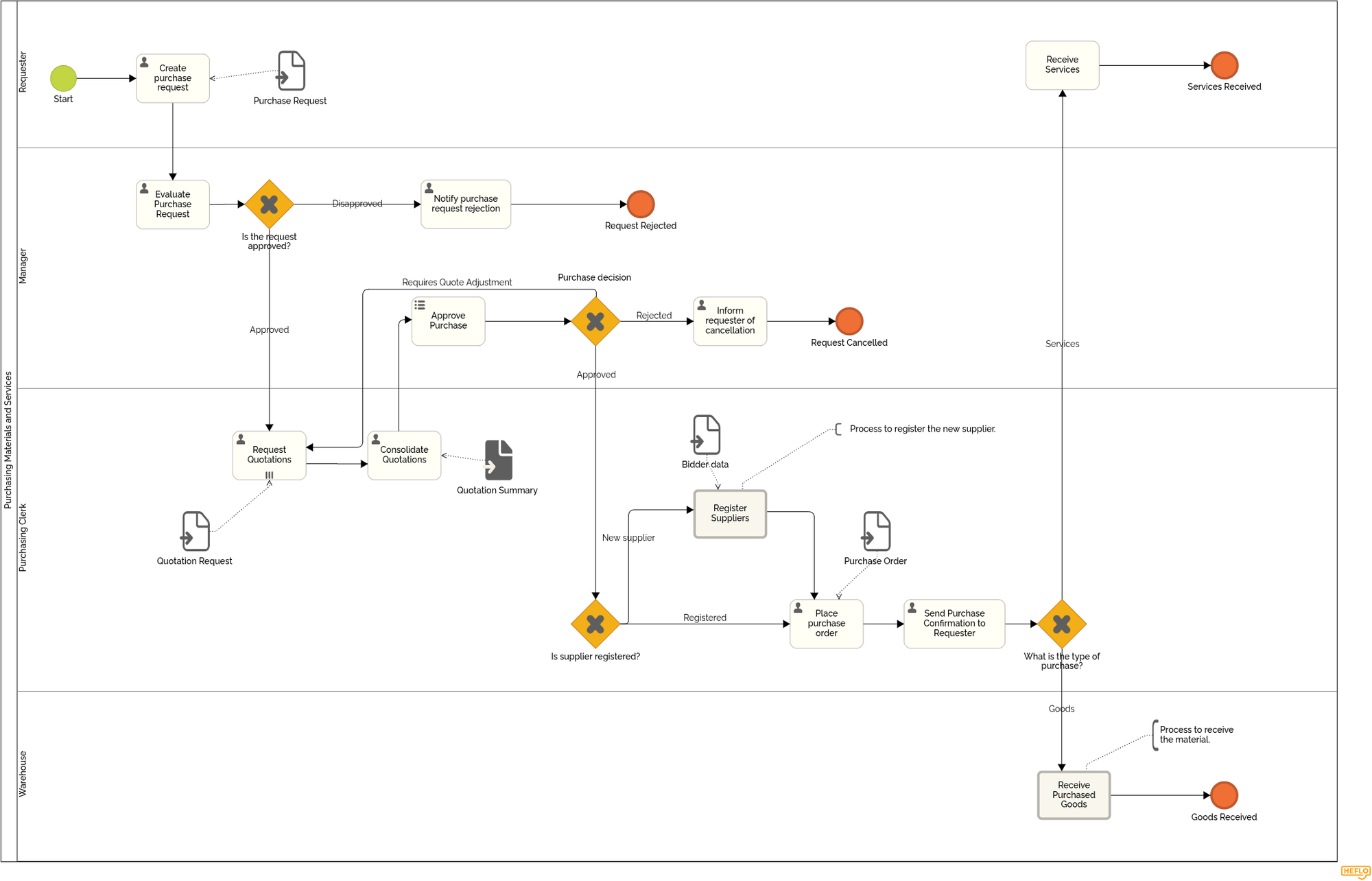
Level 1 reduces confusion, but it is limited. A diagram alone usually does not explain detailed rules, systems, exceptions, or work instructions.
Level 2: Structured documentation
At Level 2, the organization adds detailed information to the process model.
For onboarding, this is where the documentation becomes a real learning asset. The new employee can understand what each activity means, who performs it, which rules apply, what documents are required, and how exceptions should be handled.
Example: a finance analyst can open the accounts payable process and learn how invoice validation works, which approvals are required, what to do when information is missing, and which controls must be completed.
Level 2 is strong for training and knowledge transfer. However, if the documentation remains only in static PDFs or disconnected files, it may become difficult to maintain.
For a practical reference, you can explore this page with several examples of documented processes available in PDF format.
Level 3: Operational process portal
At Level 3, documented processes are published in a central, governed portal.
For onboarding, this is the most valuable level. New employees can access the processes they need by role, department, service, or responsibility. They can navigate diagrams, read instructions, access supporting materials, and provide feedback when something is unclear or outdated.
Example: a service desk analyst can access a process portal containing incident management, service request fulfillment, access requests, escalation rules, SLA guidance, and related work instructions.
Level 3 is superior because it turns process documentation into a living operational knowledge base. It supports onboarding, standardization, governance, and continuous improvement.
It also prepares the organization for execution and automation. Once processes are clear, structured, and governed, the company can automate tasks, approvals, deadlines, notifications, and handoffs.
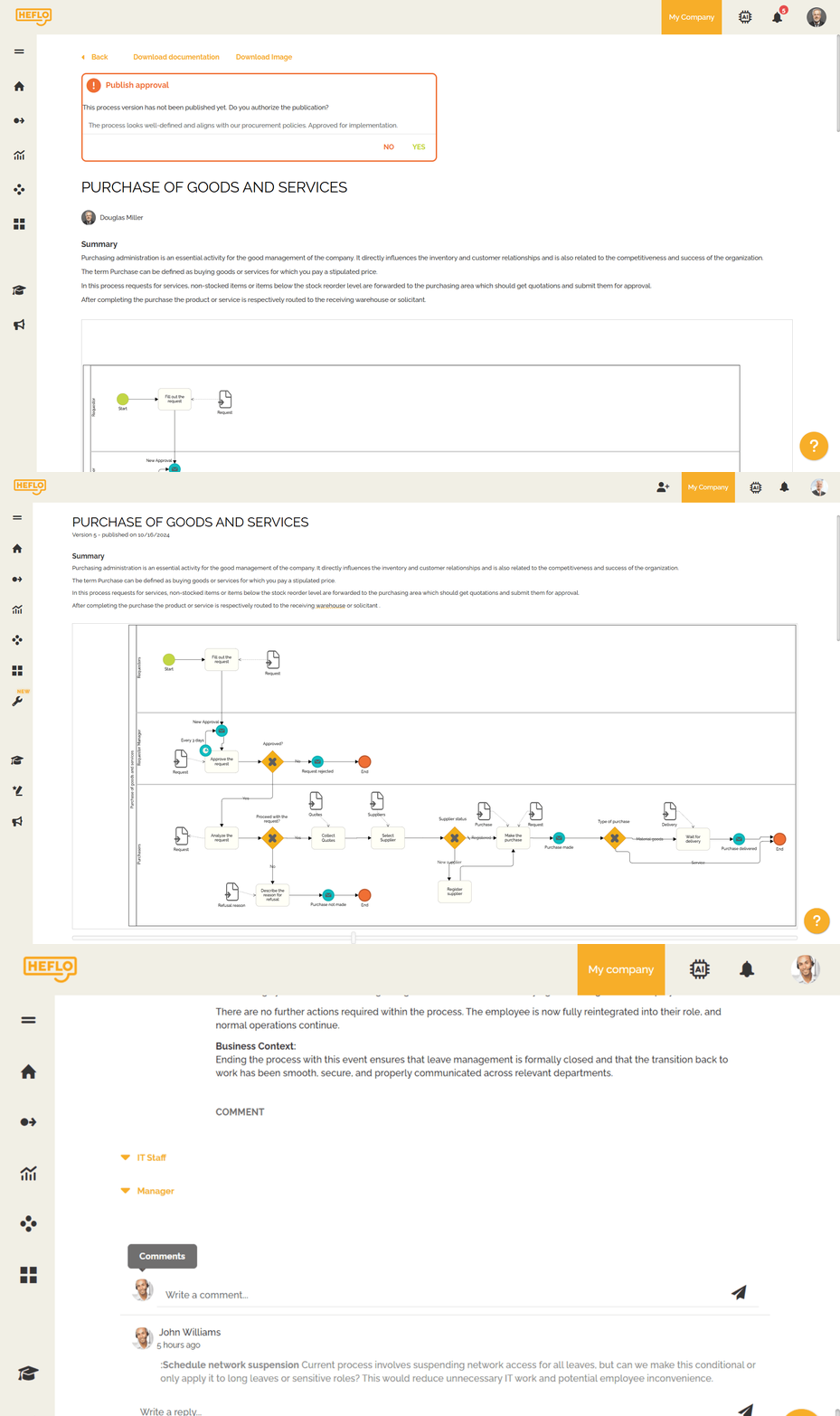
The figure below shows an example of a process portal, where documented processes are published and made accessible to employees.
Tools to document processes for employee onboarding
Organizations can start with simple tools: diagrams, shared documents, checklists, and internal wikis. This may work when the company is small or when the processes are simple.
But as onboarding becomes more role-specific, cross-functional, and operationally complex, these tools often become fragmented. Diagrams live in one place, policies in another, instructions in another, and updates depend on manual effort.
A more mature approach is to use a BPM platform that connects process modeling, documentation, publication, governance, and execution.
HEFLO supports this approach by allowing organizations to:
- Model processes using BPMN
- Document activities, rules, responsibilities, systems, and instructions
- Publish processes in a corporate process portal
- Organize process knowledge for consultation
- Maintain governed versions of documented processes
- Collect feedback for continuous improvement
- Evolve documented processes into workflow automation when appropriate
This matters for onboarding because the process portal can become a role-based operational knowledge base. A new employee does not only receive generic training. They can access the actual processes they need to perform their job.
For example:
- A finance analyst can learn accounts payable and approval processes.
- A buyer can learn procurement and supplier management processes.
- A service desk analyst can learn incident and request fulfillment processes.
- A customer support agent can learn ticket handling and escalation processes.
This work can also be accelerated with process templates. Instead of starting from a blank page, teams can review existing BPMN examples and adapt them to their reality.
HEFLO provides BPMN process examples at:
The key is not to treat documentation as a static file. The goal is to create a structured and accessible process knowledge base that helps employees learn, execute, and improve the work.
Learn BPMN before documenting your processes
If your organization plans to use process documentation as part of employee onboarding, it is worth building a basic understanding of BPMN.
BPMN helps teams represent business processes in a clear and standardized way. Instead of relying on informal flowcharts, teams can model responsibilities, activities, decisions, exceptions, events, and handoffs using a notation designed for business processes.
This is especially useful when new employees need to understand how work moves across departments, systems, approvals, and service teams.
To get started, you can watch our BPMN modeling lesson and learn the fundamentals of creating process diagrams that are easier to understand, document, and improve.
FAQ
How does process documentation help employee onboarding?
Process documentation helps employee onboarding by giving new hires a structured way to learn how work is performed in their role. It reduces dependency on informal explanations and gives employees access to the workflows, rules, systems, responsibilities, and exceptions they need to execute daily tasks.
What processes should be documented for onboarding?
The organization should document the processes that each role needs to perform. For example, finance roles may need accounts payable and approval processes, procurement roles may need purchase and supplier processes, IT roles may need incident and request processes, and customer support roles may need ticket handling and escalation processes.
Is documenting the onboarding process enough?
No. Documenting the onboarding process is useful, but it is not enough. The company also needs to document the operational processes the employee will execute after joining the role. That is what shortens the learning curve and improves consistency.
Should onboarding process documentation be role-based?
Yes. Role-based documentation is one of the most effective ways to support onboarding. It helps each employee focus on the processes that matter for their job instead of navigating a large and generic process repository.
What is the best format for onboarding-related process documentation?
The best format combines visual process diagrams, textual documentation, responsibilities, business rules, supporting materials, and centralized access. For mature organizations, a process portal is usually better than isolated PDFs or shared folders.
Conclusion
Employee onboarding is not only an HR activity. It is a knowledge transfer challenge.
New employees need to understand how work is performed in their role. Without documented processes, that knowledge remains scattered across people, tools, files, and informal explanations. The result is a longer learning curve, inconsistent execution, and repeated mistakes.
Documented business processes solve this problem by turning operational knowledge into a structured learning path. They help employees understand what to do, who is responsible, which rules apply, which systems are used, and how exceptions are handled.
The maturity path is practical: start with process diagrams, enrich them with structured documentation, and evolve toward a governed process portal. From there, process documentation can become the foundation for execution, automation, and continuous improvement.
For onboarding, the message is simple: do not only onboard people into the company. Onboard them into the work.