The Hidden Cost of Poor Processes: Rework, Delays and Errors

The hidden cost of poor processes is the time, money and customer trust lost to rework, delays, errors and compliance gaps that never appear as a line in the budget. Among 43 respondents to the HEFLO Process Maturity Assessment, rework is the most frequently reported consequence of unclear processes, cited by 69.8% of them.
The figures in this article come from two HEFLO self-assessments run between April and October 2026; the method is described at the end. They show where the cost usually sits. To put a number on your own, use the Process Cost Ledger and the rework calculation further down.
What is the cost of poor processes?
The cost of poor processes is everything an organization loses because work is unclear, inconsistent or undocumented. A small part of it is visible: overtime, a late-payment penalty, a refund. Most of it is not. It hides in hours spent redoing tasks, requests waiting in someone's inbox, errors fixed further down the line and new hires learning by trial and error.
Accounting does not capture this. Payroll records the hours people work, not how many of them went into correcting earlier work. The general ledger shows what a team costs, not the share swallowed by follow-up emails. With no budget line of its own, the loss is absorbed into salaries and overhead, and nobody owns it.
That is the main reason process optimization projects stall in budget meetings. Everyone agrees the problem exists, yet no one can say what it costs.
Which problems do unclear processes cause most often?
The HEFLO Process Maturity Assessment asks which problems unclear processes cause in the respondent's organization, with up to four answers allowed. Among the 43 people who answered:
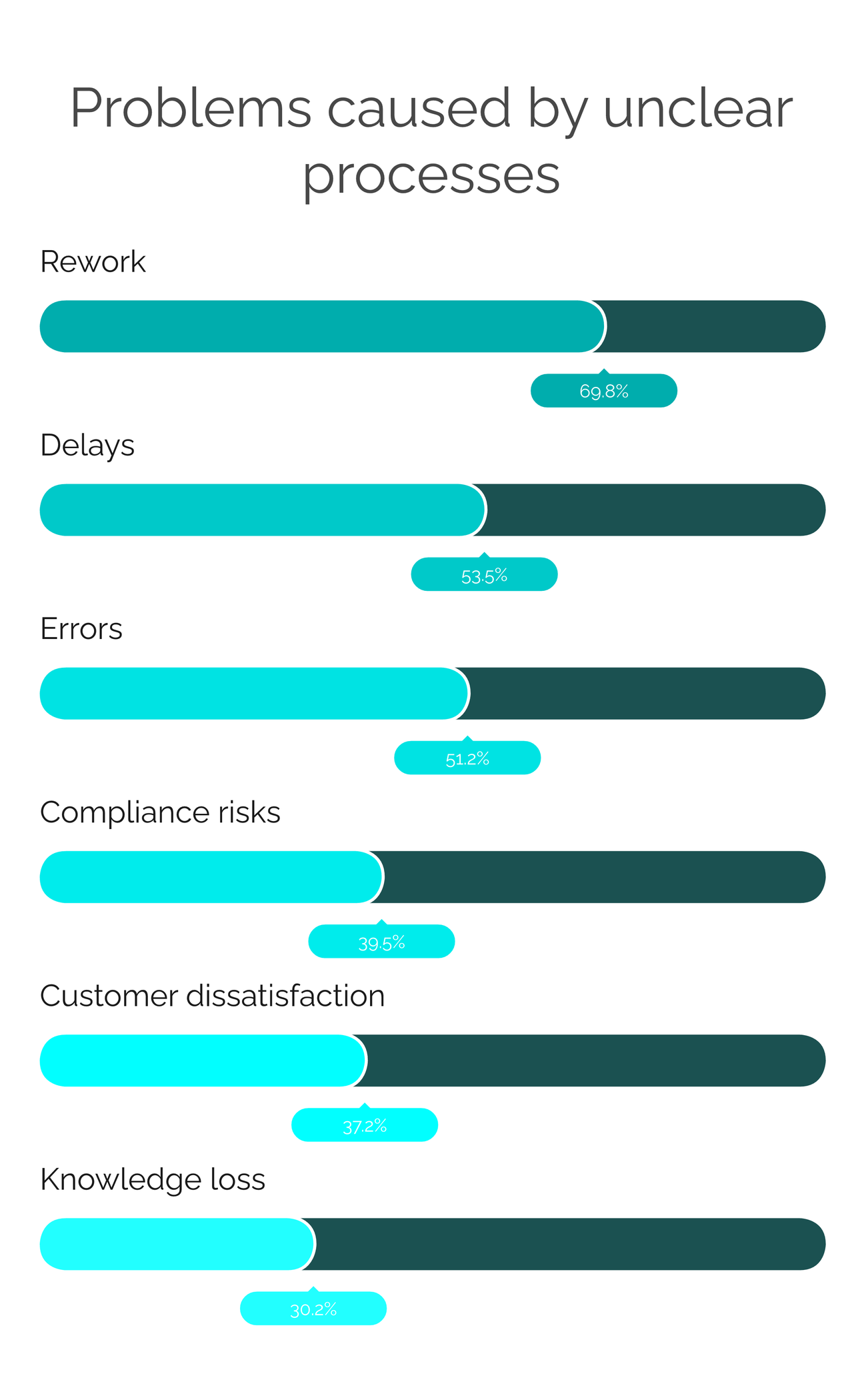
- Rework: 69.8%
- Delays: 53.5%
- Errors: 51.2%
- Compliance risks: 39.5%
- Customer dissatisfaction: 37.2%
- Knowledge loss: 30.2%
- No major problems: 11.6%
Rework leads by more than 16 points. The top three problems are also the ones you can count in hours and cases, which makes rework, delays and errors the easiest place to start pricing unclear processes.
Why is rework the biggest hidden cost?
Asked to pick the single biggest impact of unclear processes, 47.7% of 44 respondents to the HEFLO Process Maturity Assessment choose rework. Customer dissatisfaction comes a distant second at 20.5%, and delays third at 18.2%.
For many teams, redoing work is routine. In the same assessment, 44.2% of 43 respondents say they redo work "sometimes" and 32.6% "frequently".
Rework costs money in two ways. The organization pays for the task, then pays again for the correction. And every hour spent correcting is an hour taken from new demand, so output drops while headcount stays flat. That second effect rarely shows up as an overrun in the budget. It shows up as a backlog that keeps growing.
Rework also points to a defect upstream, such as a form that lets incomplete requests through or an approval rule that each person reads differently. Once the cause is fixed, that rework stops. Pushing the team to work faster does not help; it only speeds up the same corrections.
How much time do teams lose to unclear processes?
When the HEFLO Process Maturity Assessment asks how much time unclear processes waste, 46.5% of 43 respondents answer "significant" and 37.2% "moderate".
The time goes to small, familiar tasks: looking for the latest version of a procedure, asking a colleague how to handle a case, chasing an approval by email, retyping data from one system into another. None of it is logged as lost time. On a timesheet, it all looks like normal work.
This makes lost time the easiest hidden cost to turn into money. Hours multiplied by a loaded hourly rate give finance a figure it can check.
How do poor processes affect customer experience?
Of the 42 respondents who answered this question in the HEFLO Process Maturity Assessment, 33.3% describe the impact of unclear processes on their customers as "significant" and 47.6% as "moderate".
Customers never see the process itself, only what it produces: an order status nobody can confirm, two agents giving two different answers, a correction that arrives after the deadline. Each of these triggers a contact, and each contact creates more internal work, this time in customer service.
Customer impact is also the slowest cost to surface. Complaints and churn appear weeks or months after the failure that caused them, and by then few people trace them back to the process.
Are most processes really inefficient?
Respondents are not alarmist about their own processes, but few are satisfied with them. Of 42 people who rated their processes in the HEFLO Process Maturity Assessment, 59.5% chose "somewhat inefficient" and 14.3% "very inefficient".
Their view of the cost follows the same pattern. Asked what unclear processes cost their organization, 55.8% of 43 respondents to the same assessment say "moderate cost" and 32.6% say "high cost".
"Somewhat" and "moderate" are the answers to watch. Moderate inefficiency is easy to live with because no single incident forces a decision, so it can last for years. It is also where a structured calculation changes the conversation most: small losses added up over twelve months often produce a figure that management can no longer set aside.
What is the Process Cost Ledger?
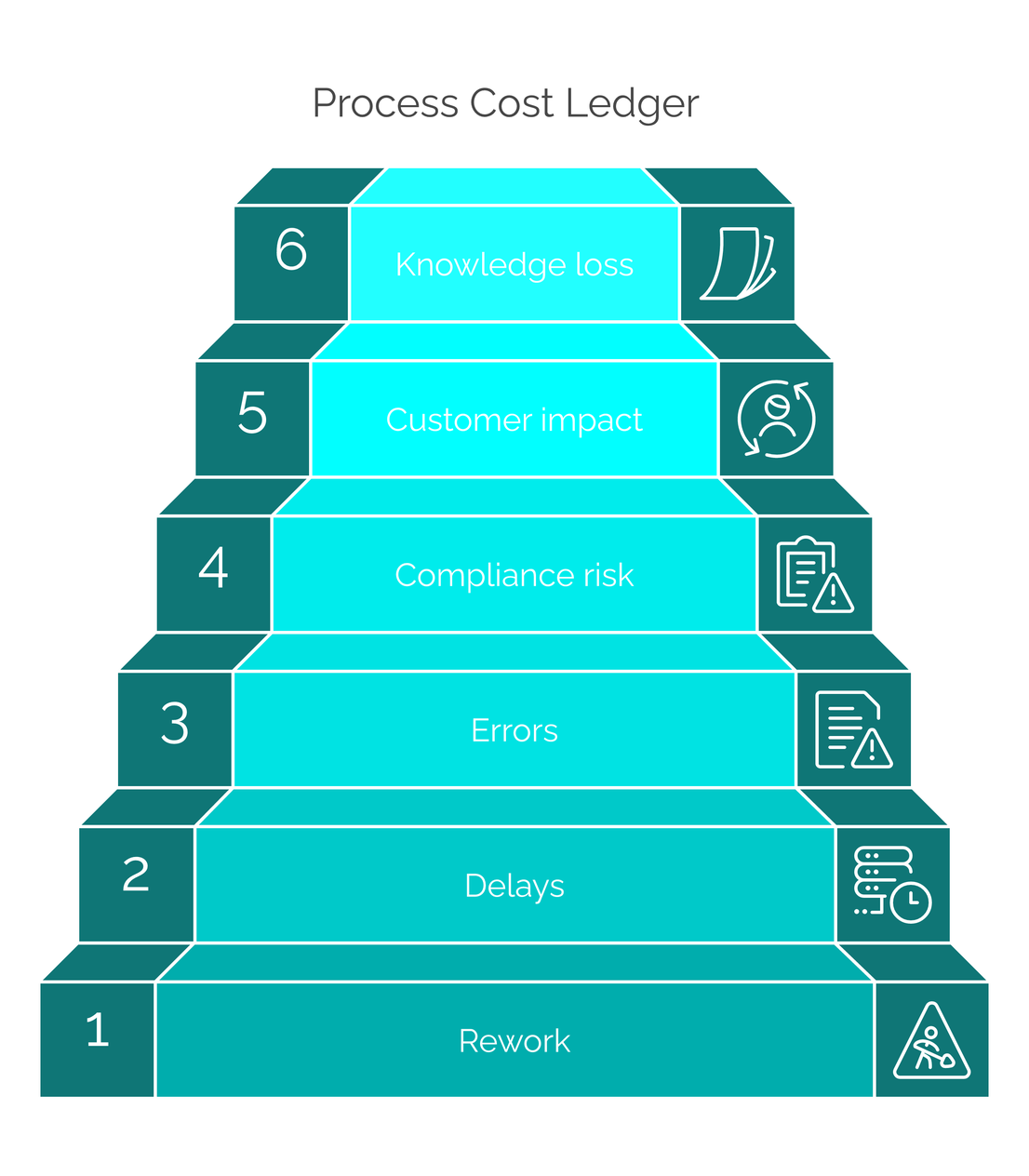
The Process Cost Ledger is a six-line framework, developed by HEFLO, for turning the hidden cost of poor processes into one annual figure. The lines follow the order in which respondents cite the problems, from rework to knowledge loss. Each line has a measurement and a formula, and the total is the annual cost of inaction.
| # | Cost line | What to measure | Annual formula |
|---|---|---|---|
| 1 | Rework | Hours spent redoing tasks per month | Rework hours per month × loaded hourly cost × 12 |
| 2 | Delays | Days of delay and the cost of each day (penalties, lost sales, tied-up capital) | Average delay in days × number of delayed cases × cost per day of delay |
| 3 | Errors | Errors that reach the customer or finance | Number of errors × average cost to correct one error |
| 4 | Compliance risk | Non-conformities found in audits | Audit findings × remediation cost per finding (+ exposure to fines) |
| 5 | Customer impact | Complaints, churn, service rework | Customers affected × value at risk per customer |
| 6 | Knowledge loss | Ramp-up time of new hires; dependence on key people | Weeks of ramp-up × weekly cost × new hires per year |
| Total | Annual cost of inaction | Sum of lines 1 to 6 |
Fill in each line with your own annual figures. If a line cannot be measured yet, write "not quantified" instead of guessing. A finance team will trust a ledger with four solid lines more than one with six estimates. Watch for double counting as well: an hour of correction already counted under rework should not appear again under errors.
How do you calculate the cost of rework?
The cost of rework for one process can be calculated in five steps, with nothing more than a spreadsheet.
- Identify the tasks that get redone. List the points where work is returned, corrected or repeated: rejected requests, incomplete forms, invoices sent back, approvals restarted. A process map helps, because rework loops show up as arrows pointing backwards.
- Estimate rework hours per month. For each task, multiply the cases redone per month by the average time needed to redo one. If you have no data, sample two to four weeks. Formula: rework hours per month = cases redone per month × hours per redo.
- Apply the loaded hourly cost. Use salary plus employer charges and overhead rather than gross salary, and note the rate you used. Formula: monthly rework cost = rework hours per month × loaded hourly cost.
- Annualize. Multiply by 12 and adjust for seasonal peaks if volumes vary. Formula: annual rework cost = monthly rework cost × 12.
- Add the other ledger lines. Apply the same logic to delays, errors, compliance risk, customer impact and knowledge loss, then add the six lines together to get the annual cost of inaction.
Illustrative example, not survey data: a team redoes 100 cases a month and each correction takes half an hour. That is 50 hours of rework per month. At a loaded cost of €40 an hour, rework costs €2,000 a month, or €24,000 a year, before delays, errors or customer impact are counted.
Why is process improvement hard to fund?
On paper, documentation matters. Among 45 respondents to the HEFLO Process Maturity Assessment, 48.9% rate process documentation as "important" and 37.8% as "critical".
Executive sponsorship comes from a different survey, with different respondents. In the HEFLO Business Process Digitalization Assessment, 45.5% of 22 respondents report "limited" executive sponsorship for process initiatives and 13.6% report none. The sample is small, so read this as a direction rather than a measurement.
Budget is the other obstacle. In the same digitalization assessment, 56.5% of 23 respondents name budget constraints as a barrier. Only resistance to change is cited more often, by 60.9%.
Anyone who has pitched an improvement project will recognize the situation. The work is considered important, but without a cost attached it loses the budget discussion to projects that arrive with numbers.
How do you build a business case for BPM software?
A business case for BPM software comes down to two numbers: the annual cost of inaction from the Process Cost Ledger, and the annual investment needed to fix the process. Four steps keep it credible:
- Start with one process. Pick the one with the most rework, which is not always the most visible one.
- Fill in the ledger conservatively. Use measured hours and documented incidents, and mark unmeasured lines "not quantified".
- Price the full investment. That means the total cost of ownership of the BPM software: subscription or license, implementation, training, infrastructure and consulting.
- Express the result as return on investment and payback. ROI = (annual cost avoided − annual investment) ÷ annual investment. Payback in months = first-year investment ÷ monthly net savings.
Finance reviewers tend to trust a smaller measured figure over a larger estimated one, so conservative assumptions make the case stronger.
Which costs does BPM software reduce, and which does it add?
BPM software cuts the cost of poor processes by building rules, assignments and records into the workflow. It also brings costs of its own, and an honest comparison has to show both.
| Cost line | Without process management | With BPM software | What to measure |
|---|---|---|---|
| Rework | Errors discovered late; tasks redone | Rules and validations built into the workflow | Rework hours per month |
| Delays | Invisible queues; follow-up by email | Assigned tasks, deadlines and alerts | Cycle time; % of cases completed on time |
| Errors | Data re-keyed; divergent versions | Standardized forms; a single current version | Errors per 100 cases |
| Compliance | Incomplete approval trail | History of approvals and versions | Audit findings |
| Customer impact | Status unknown | Status visible for each case | Complaints; response time |
| Knowledge loss | Knowledge held by individuals | Process published and executed | Ramp-up time of new hires |
| Costs added | License or subscription, implementation, training, administration | Full investment (see the business case above) |
The software is only half of the answer. A BPM tool automates whatever process it is given, flaws included, so automating a badly designed process just produces the same errors faster. The savings come from redesigning the process first and then using the workflow to enforce the new design, which is the core of process optimization.
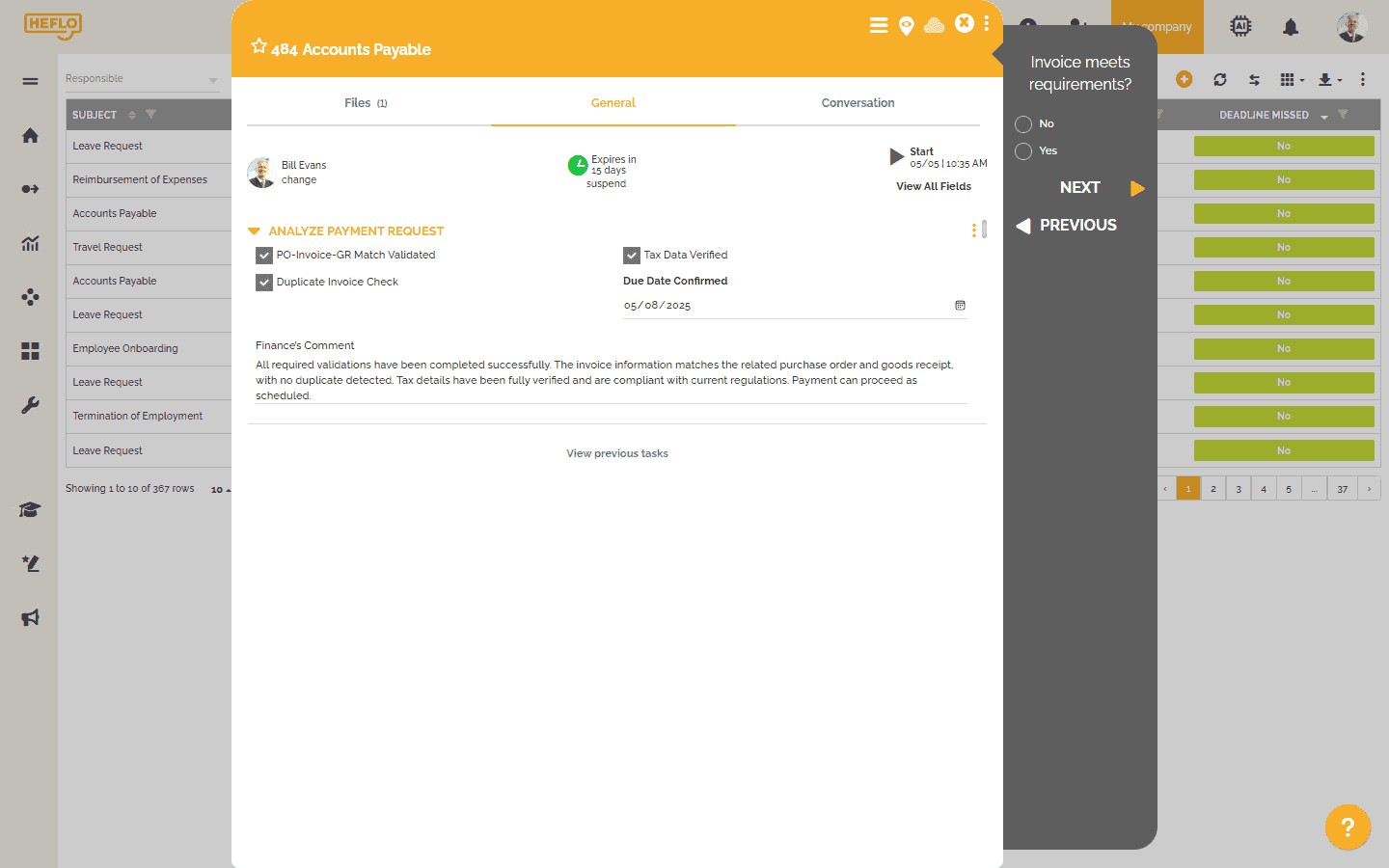
HEFLO shows how these capabilities map to the ledger. Processes are modeled in BPMN 2.0 and run as automated workflows with standardized forms. Deadlines trigger alerts, and documentation is published to a portal with version history. How much each ledger line falls depends on the process, so it should be measured against the ledger baseline.
How can you cut process costs on a tight budget?
On a tight budget, the way to reduce process costs is to keep the first project small. Five rules keep the investment low and the payback short:
- Start with the one or two processes that generate the most rework. The ledger shows which ones; leave the merely annoying processes for later.
- Document before you automate. A published BPMN diagram and a clear procedure already cut down questions and errors.
- Choose an accessible SaaS solution. A cloud tool takes servers, installation and maintenance out of the budget.
- Prefer a low-code approach. Business analysts can configure forms and workflows themselves, without a development project.
- Measure for 90 days, then expand. Re-run the ledger on the pilot process and use the result to fund the next one.
HEFLO's plans follow this sequence. The free Academic plan covers BPMN process diagramming, the Lite plan adds task and deadline control, monitoring dashboards and documentation publishing, and the Enterprise plan adds automation, web service integration and implementation services. Because HEFLO is a low-code cloud platform, the first process can be configured without a software development cycle.
How was this data collected?
Methodology: HEFLO self-assessments
- Sources: two free online self-assessments published by HEFLO, the HEFLO Process Maturity Assessment and the HEFLO Business Process Digitalization Assessment.
- Period: Process Maturity Assessment, 83 unique sessions between April 2, 2026 and October 28, 2026. Business Process Digitalization Assessment, 43 unique sessions between April 26, 2026 and October 30, 2026.
- Sample per question: each question has its own number of respondents (n=42 to n=45 for the Process Maturity Assessment, n=22 to n=23 for the Business Process Digitalization Assessment); the n is reported with each figure.
- Languages: answers from the English, Portuguese, Spanish and French versions are combined.
- Respondents: anonymous and self-selected, so organizations already concerned about their processes are probably over-represented. Results describe respondents, not all organizations or any specific country.
- Multiple choice: the question on problems caused allowed up to four answers, so its percentages add up to more than 100% and should not be summed.
- Separate groups: the two assessments have different respondents, and their figures should not be combined.
- Data export: November 2, 2026.
Used this way, the survey data tells you what to measure first. Your own ledger tells you what it costs.
From hidden cost to measured cost
The cost of poor processes rarely appears as a budget line, but it is paid every month in rework, delays and errors. Measuring it is the first step to a credible business case. In HEFLO's survey data, rework tops every ranking, which makes the rework line of the ledger the natural place to start.
Estimate your own exposure: take the free Process Maturity Assessment
See where your organization stands before you fill in the ledger. The Process Maturity Assessment is free, requires no signup, and compares your answers with similar organizations.
Ready to fix your highest-rework process? Start a free HEFLO trial or request a demo.
FAQ: cost of poor processes
What is the cost of poor processes?
The cost of poor processes is the time, money and customer trust lost to rework, delays, errors, compliance gaps, customer impact and knowledge loss. It rarely appears as a budget line because it is paid through salaries and overhead. The Process Cost Ledger adds these losses up into one annual figure.
How do you calculate the cost of rework?
Multiply the rework hours per month by the loaded hourly cost, then by 12. Rework hours are the cases redone each month multiplied by the average time to redo one case. Use the loaded cost (salary plus employer charges and overhead), not gross salary.
What is the most common consequence of unclear processes?
Rework. Among 43 respondents to the HEFLO Process Maturity Assessment, 69.8% cite rework as a problem caused by unclear processes, ahead of delays and errors.
How do unclear processes affect customers?
Customers experience unclear processes as uncertain status, inconsistent answers and late corrections. Among 42 respondents to the HEFLO Process Maturity Assessment, 47.6% report a "moderate" impact on their customers and 33.3% a "significant" one.
How do you justify investing in BPM software?
Compare the annual cost of inaction, measured with the Process Cost Ledger, with the full annual investment in the BPM software, including implementation, training and administration. When the cost of inaction is clearly higher, the investment is justified. A pilot on one high-rework process is the simplest way to prove it.
What is the ROI of BPM software?
There is no universal ROI figure for BPM software, because the return depends on the process. Calculate it as (annual cost avoided − annual investment) ÷ annual investment, using the Process Cost Ledger for the cost avoided and the full investment, not just the license, as the denominator.
Is BPM software worth it on a tight budget?
Yes, if the first project is small. An organization on a tight budget should start with the one or two processes that cause the most rework, use an accessible SaaS solution with a low-code approach and measure the results for 90 days before expanding.
Which BPM software offers the best value for money?
Best value for money means the tool whose full cost stays clearly below the cost of inaction it removes, so compare vendors against your own Process Cost Ledger, not only against each other's prices. HEFLO, for example, publishes a free Academic plan and a Lite plan that can be bought online, with Enterprise quoted on request.
Is HEFLO a good BPM software to reduce rework?
HEFLO targets the usual causes of rework: processes modeled in BPMN 2.0, automated workflows with standardized forms, deadline control with alerts, and published documentation with version history. It suits organizations that want low-code automation without a long implementation project. The actual reduction in rework should be measured against a ledger baseline.
What is the difference between the cost of poor processes and the total cost of ownership of BPM software?
The cost of poor processes is what an organization loses by not managing its processes: rework, delays, errors and the other ledger lines. The total cost of ownership is what it pays to own BPM software: license, implementation, training, infrastructure and consulting. A business case compares the two.