When Should You Keep SAP GUI Instead of Moving to Fiori?

If your organization is running an S/4HANA project, you have probably heard some version of the same message: SAP Fiori is the future, SAP GUI is the past, and every transaction should eventually become a tile on the Launchpad.
The reality inside most SAP landscapes is more nuanced. SAP Fiori is a genuine improvement for many scenarios — approvals on a phone, self-service requests, analytical overviews, guided tasks for occasional users. But treating Fiori as an automatic replacement for every SAP GUI transaction is a project decision, not a user decision, and it often backfires. Teams that force a full migration without evaluating how work is actually performed tend to see the same symptoms: accounts payable clerks who quietly ask for their old transaction back, warehouse supervisors juggling three apps to do what one screen did before, help desks flooded with "where did my transaction go?" tickets, and adoption reports that look worse three months after go-live than on day one.
This article is not a defense of SAP GUI, and it is not a critique of SAP Fiori. It is a practical guide to a question every S/4HANA and interface modernization team eventually faces: for this specific user, process, and task — which interface actually fits?
SAP GUI and SAP Fiori Solve Different Problems
Part of the confusion comes from comparing the two as if they were competing versions of the same thing. They are not.
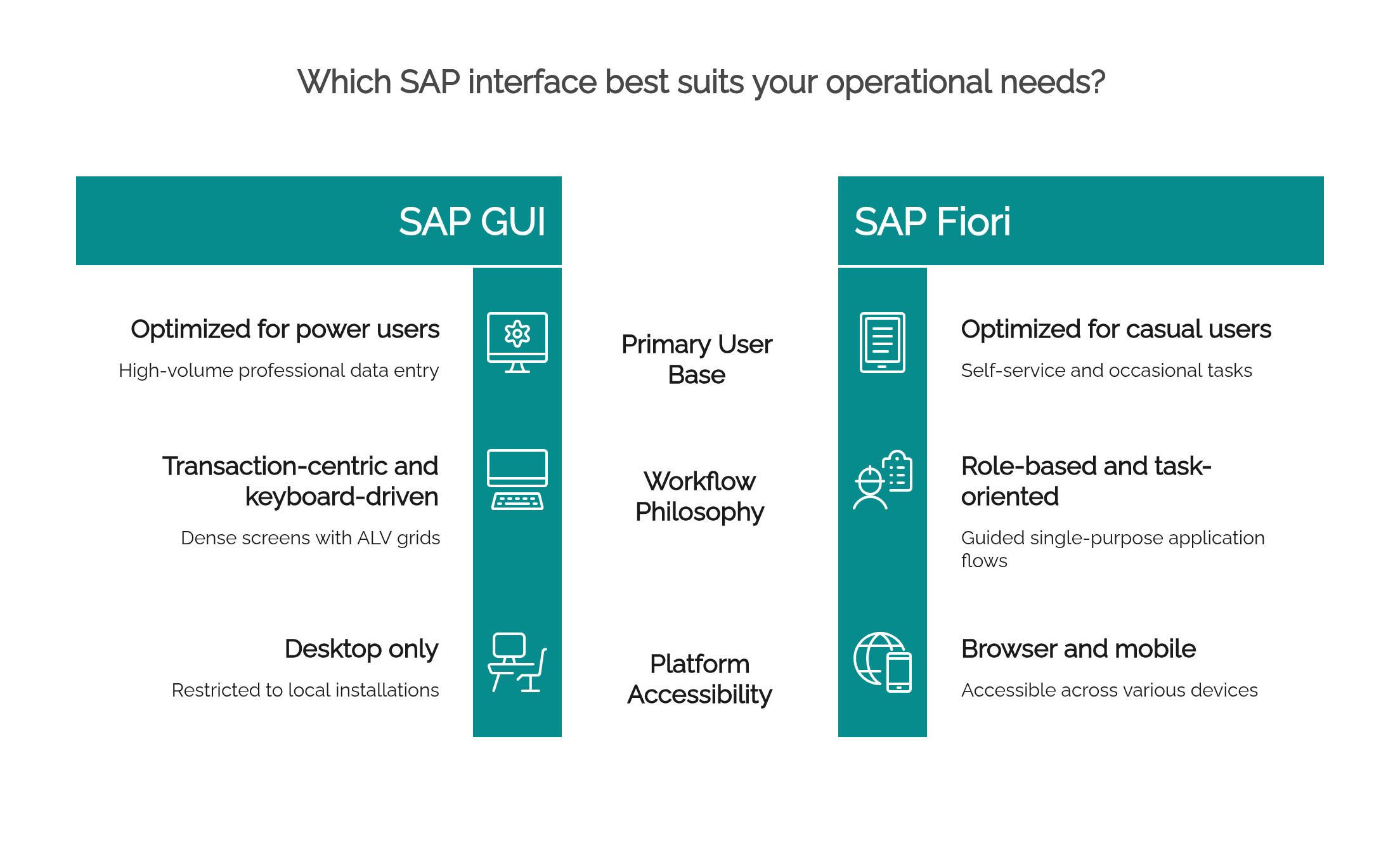
SAP GUI is transaction-centric. It was built around the idea that a trained user opens a transaction code — VA01, ME21N, MIGO, FBL1N — and works through a dense, keyboard-driven screen that exposes almost everything the underlying business object can do. Tabs, function keys, ALV grids, layout variants, batch input: the design assumes expertise and rewards it. For someone who runs the same transaction two hundred times a day, that density is not clutter. It is throughput.
SAP Fiori is role-based and task-oriented. Instead of asking "which transaction do I need?", it asks "what does this role need to accomplish?" A Fiori app typically isolates one task — approve a purchase requisition, create a leave request, check supplier invoices — and presents it in a modern, responsive, browser-based interface that works on a desktop, tablet, or phone. For someone who touches SAP twice a month, that focus is not limiting. It is what makes the task possible without training.
Framed this way, the question "Which one is better?" has no useful answer. The useful question is: which one fits this user, this process, and this task? The rest of this article breaks that question into concrete decision criteria.
When SAP GUI May Still Be the Better Choice
There are recurring scenarios where SAP GUI remains the more practical option, even in a mature S/4HANA environment:
- High-volume operational work. Roles that process large queues of documents — invoice verification with MIRO, goods movements with MIGO, sales order entry with VA01 — depend on repetition, muscle memory, and minimal clicks per document. A screen redesign that adds even two seconds per document costs hours per week at scale.
- Users who work through transaction codes and shortcuts. Experienced users navigate SAP by typing /n and a T-code, chaining screens with function keys, and jumping between sessions. Replacing that with tile navigation and search removes a working method they have optimized for years.
- Tasks that need many fields, tabs, filters, or data grids. Some business objects are simply complex. A production order, a WBS element, or a full material master (MM02 with its dozens of views) does not become simpler because the screen is simpler — the complexity just gets split across more steps.
- Processes with mature GUI transactions and no equivalent Fiori app. SAP's Fiori catalog is large but not complete, and coverage varies by module and release. Where the classic transaction is the only full-featured option, keeping it is not resistance to change; it is the only way to do the work.
- Highly customized transactions. Z-transactions, screen exits, custom fields, and enhancement-heavy processes often have no Fiori counterpart at all, and rebuilding them as custom Fiori apps is a development project, not a configuration task.
- Technical and administrative work. Basis, ABAP, and support activities — SE38, SM37, ST22, SU01, SPRO — live naturally in SAP GUI. There is little practical value in moving job monitoring or debugging to a browser tile.
- Situations where speed and density outweigh visual simplicity. When the measure of success is documents per hour rather than ease of first use, the denser interface frequently wins.
When SAP Fiori May Be the Better Choice
The same logic runs in the other direction. There are scenarios where SAP GUI is clearly the wrong tool and Fiori delivers real, measurable value:
- Mobile and tablet use. SAP GUI was never designed for a phone. Fiori was.
- Field operations. Technicians confirming maintenance orders, drivers recording deliveries, or inspectors capturing results on site benefit directly from responsive, touch-friendly apps.
- Casual users. An employee who submits one expense report a month should never need to learn a transaction code.
- Manager approvals. Approving purchase requisitions, leave requests, or timesheets from an inbox app — often in seconds, from anywhere — is one of Fiori's strongest use cases.
- Self-service scenarios. HR self-service, procurement requests, and travel management work better as guided journeys than as expert transactions.
- Role-based access. Presenting each role only the tiles it needs reduces noise and simplifies onboarding compared to a blank GUI command field.
- Focused, single-purpose tasks. When a task has a clear beginning and end, a dedicated app is easier to learn and harder to get wrong.
- Analytical overviews. Overview pages, KPI tiles, and embedded analytics give managers and key users at-a-glance insight that classic transactions never offered.
- Simplified user journeys. Processes redesigned around fewer steps — situation handling, guided workflows — can genuinely reduce effort, not just repaint the screen.
- New users. People joining the organization without SAP history learn Fiori's task-based model far faster than transaction codes.
A credible interface strategy acknowledges both lists. The mistake is applying either one universally.
Functional Coverage: Does the Fiori App Really Replace the GUI Transaction?
The most common — and most expensive — mistake in Fiori rollouts is assuming that an app with the same purpose as a transaction has the same functionality. Before retiring any GUI transaction, teams should validate coverage point by point:
- Required fields: Are all fields the business actually uses available in the app, including ones added over the years?
- Required actions: Can users perform every operation — not just create and display, but reverse, block, release, reassign, mass-change?
- Variants: Do users rely on selection variants or layout variants that the app cannot reproduce?
- Filters: Can users filter and sort the way they do today, especially on large result sets?
- Exports: Is export to spreadsheet available, complete, and formatted usably?
- Attachments: Are document attachments visible, and can users add them?
- Approvals: Does the app integrate with the same workflow, agents, and escalation rules?
- Exceptions: Can users handle the non-happy path — partial deliveries, price differences, blocked documents?
- Custom fields: Do customer-specific fields appear, and are they editable where needed?
- Reports: Do downstream reports and follow-up transactions still connect naturally?
- Authorization behavior: Fiori uses catalogs, groups, and OData services on top of classic authorization objects — does the effective access match what users have today?
- Surrounding process steps: Can the user navigate to the next step in the process, or does the app end in a dead end that forces a switch back to GUI anyway?
A Fiori app that covers 85% of a transaction sounds close. In operational reality, the missing 15% often contains exactly the exception handling that experienced users deal with daily. If users must open SAP GUI to finish what the app started, the migration has added a step rather than removed one.
User Profile: Casual User, Key User, or Power User?
Interfaces are not evaluated in the abstract; they are evaluated by people with very different relationships to the system.
A casual user measures an interface by whether they can complete the task without help. A manager measures it by how quickly they can act on what is waiting for them, often from a phone between meetings. A key user needs enough visibility to answer questions from their team and spot process problems. A consultant or support analyst needs to navigate deep into documents, tables, and logs to diagnose issues. A power user measures the interface in keystrokes and seconds, because their day is made of thousands of both.
| User profile | Typical need | Better fit may be |
|---|---|---|
| Casual user | Complete an occasional task without training | SAP Fiori |
| Manager / approver | Fast, mobile, low-friction decisions | SAP Fiori |
| Key user | Broad process visibility, some depth | Often both, depending on task |
| Consultant / support | Deep navigation, diagnostics, configuration | SAP GUI |
| Power user | Speed, density, keyboard control | SAP GUI (for core work) |
The practical implication: interface decisions made per role and task will outperform decisions made per transaction. The same purchase order process may be Fiori for the requester, Fiori for the approver, and GUI for the buyer who processes fifty orders a day.
Task Frequency and Data Density
Two dimensions predict interface fit better than almost anything else: how often the task is done, and how much data it involves.
Frequency changes what "usable" means. A task performed once a month can tolerate — and even benefits from — guidance, extra confirmation steps, and explanatory screens. The user has forgotten the details since last time. A task performed hundreds of times a week cannot tolerate any of that. Every guided step that helps the monthly user is friction for the daily one.
Density changes what "simple" means. Large ALV grids in SAP GUI let users scan hundreds of line items, sort, subtotal, filter, and edit in place. Simplified list screens that show fewer columns and paginate results can turn a two-minute review into a fifteen-minute scroll. When the job is fundamentally about moving through many records — clearing open items, reviewing MRP results, reconciling stock differences — a screen optimized for readability of a single record works against the task.
Neither point is an argument against Fiori in general. Fiori list reports with smart tables handle substantial data volumes, and some scenarios are dramatically better in Fiori. The point is that frequency and density should be measured for the real task before deciding — not assumed from a demo with ten sample records.
Performance and Productivity
Performance discussions around Fiori often stay theoretical until go-live, and then become very concrete. Teams should evaluate realistically:
- Launchpad loading time, especially the first load of the day and after cache invalidation.
- Number of roles and apps assigned to a user — heavily loaded Launchpads with hundreds of tiles load slower and are harder to navigate.
- Browser behavior, including corporate browser policies, extensions, and memory limits on older client machines.
- Network conditions — Fiori is chattier over the network than GUI's optimized protocol, which matters for remote plants, VPN users, and low-bandwidth sites.
- Backend and OData service performance, since a well-designed app on a slow gateway is still a slow app.
- The gap between test and production — an app tested with 50 documents behaves differently with 50,000.
- Perceived speed vs. technical availability — a system can be "up" and still feel sluggish, and users judge the feeling, not the monitoring dashboard.
Performance deserves attention because it is not just an IT metric. It is an adoption variable. Users who experience a slow Launchpad in their first week form an opinion that training will not undo, and they will find their way back to GUI — officially or not. If the Fiori experience cannot be made responsive under real conditions for a given task, that is a legitimate reason to keep the GUI transaction until it can.
Customization and Legacy Processes
Most SAP environments older than a few years are not standard. They carry user exits, BAdIs, custom screens, Z-fields, validation logic, and entire Z-transactions built around how the business actually runs. This installed base changes the migration equation significantly. Before moving a customized process to Fiori, teams should evaluate:
- Does the process follow standard SAP assumptions? Fiori apps are built for standard processes. The further a process has drifted from standard, the less likely the app fits without modification.
- Does the app support the custom document types, fields, validations, or screens in use? Some extensions carry over through in-app extensibility or key-user fields; deeply embedded screen logic usually does not.
- Does the transaction have local enhancements that users depend on? A custom button that automates a five-step correction may be invisible in documentation but essential in daily work.
- Is rebuilding the experience worth the effort? Recreating a heavily customized transaction as a custom Fiori app is real development — design, OData services, UI5 or Fiori elements work, testing, and ongoing maintenance.
- Is keeping SAP GUI simply more practical for this case? Sometimes the honest answer is yes, at least for the current planning horizon.
There is also a strategic version of this question: if a process is so customized that no standard app fits, the right long-term move may be to redesign the process toward standard rather than rebuild the customization in a new interface. But that is a process decision that deserves its own project — not a side effect of a UI migration.
Mobile Is Not Always the Deciding Factor
"Fiori is mobile" is true, and it is one of the strongest arguments for adoption — for the scenarios that are actually mobile. Field service confirmations, warehouse tasks on handhelds, approvals on phones, plant maintenance rounds: these are real, high-value cases where mobility changes how work gets done.
But a large share of SAP work is, and will remain, desktop work. A financial accountant closing the month, a materials planner reviewing MRP exceptions, a customer service agent on a headset entering orders — these users sit at desks with large monitors and full keyboards. For them, "it also works on a phone" delivers no benefit, and mobile-first design choices (larger touch targets, fewer visible fields, vertical layouts) can subtract from the desktop experience.
The test is simple: does anyone actually perform this task away from a desk, or would they if they could? If yes, mobility is a strong argument for Fiori. If no, the decision should rest on the other criteria in this article — coverage, density, performance, user profile — with mobility weighted at zero rather than assumed as a benefit.
Training and Change Management
Even where Fiori is clearly the right destination, the transition fails without deliberate change management. Several realities need to be planned for, not discovered:
Users should not be forced into Fiori without understanding the new journey. The change is not cosmetic. Navigation logic, terminology, and the shape of the work all change.
One transaction may become several apps. What was a single screen with tabs — display supplier, change supplier, view open items — may now be three or four tiles. Users need to know that this is intentional, and where each piece went.
Users need a mapping from old to new. "Which tile replaces VA02?" is the single most common question in a Fiori rollout. A published transaction-to-app mapping, kept current, prevents thousands of support tickets.
Key users need a clear support path. When an app is missing a function or behaving unexpectedly, key users need to know whether it is a bug, a training gap, a missing authorization, or a known limitation — and who to ask.
Training should explain the process, not only the screen. Showing users where the buttons moved produces compliance. Explaining how the end-to-end process now flows — and why — produces adoption. This is especially true when the Fiori rollout coincides with actual process changes in S/4HANA, which it usually does.
A Practical Decision Checklist
SAP GUI vs SAP Fiori Decision Checklist
Run each significant transaction or task through these questions before deciding:
- Who performs this task? Casual user, manager, key user, support, or power user?
- How often is it performed? Monthly, daily, or hundreds of times per week?
- Is the task mobile or desktop-based? Does anyone need to do it away from a desk?
- Does the Fiori app cover all required functionality? Fields, actions, variants, filters, exports, attachments, exceptions?
- Are there custom fields or enhancements? Do they carry over to the app?
- Does the user need high data density? Large grids, mass processing, in-place editing?
- Is the Fiori app fast enough in real conditions? Real data volumes, real network, real client machines?
- Does the user rely on transaction codes or keyboard shortcuts? Would removing them slow the work?
- Does the process require multiple related apps? Would one transaction become a multi-tile journey?
- Is this a temporary transition or a long-term target experience? Is a better app expected in a future release?
- What training and documentation will users need? Who will produce and maintain it?
- What is the cost of forcing migration? In productivity, support load, and user trust — versus the benefit gained?
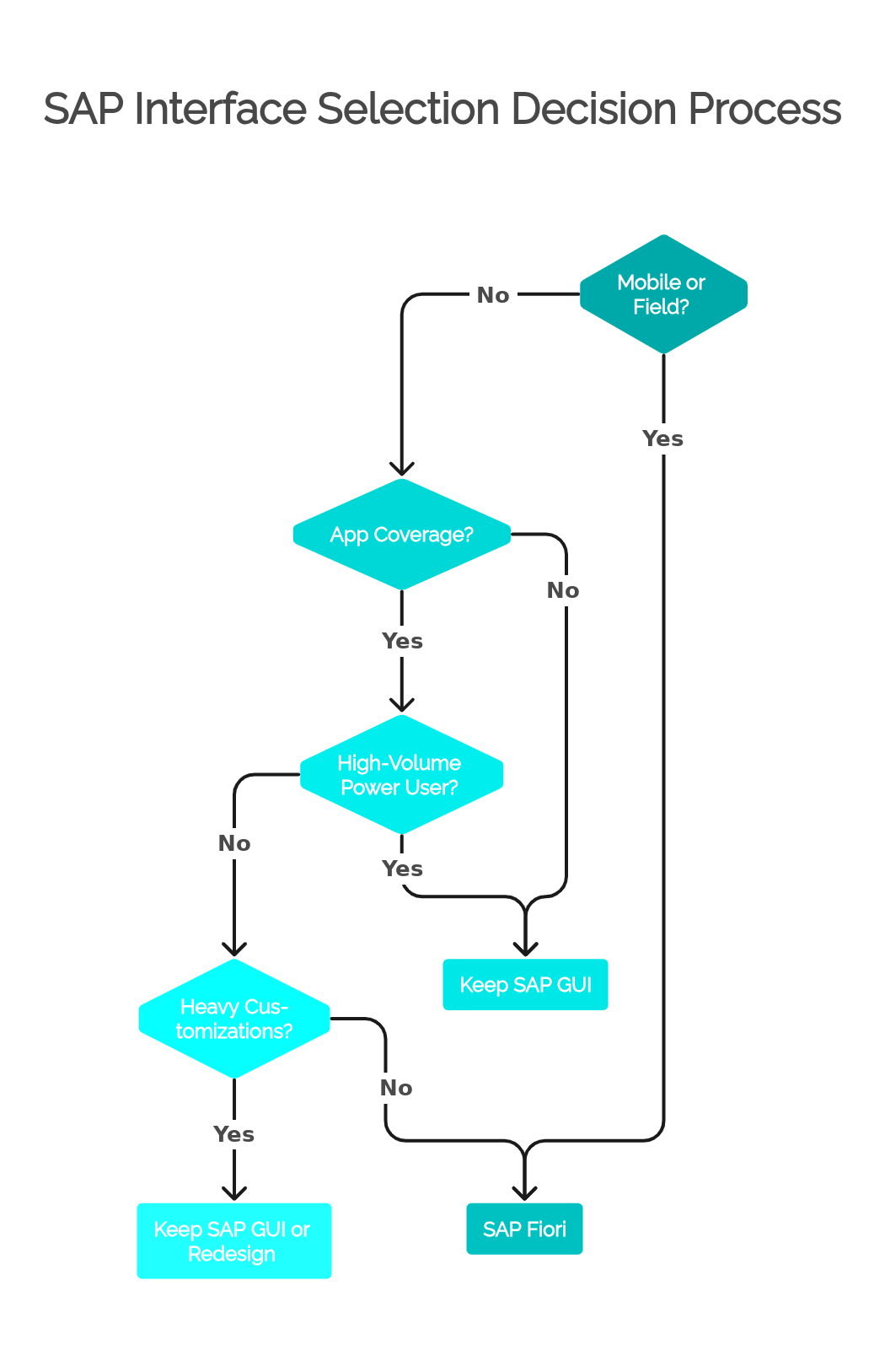
If the answers point clearly in one direction, the decision is easy. If they conflict — a mobile need but incomplete coverage, a power user but a strong analytical app — the conflict itself is the finding: that task may need both interfaces, or a redesign, rather than a forced choice.
Recommended Hybrid Strategy
For most organizations, the realistic and defensible target is not GUI-only or Fiori-only. It is a deliberate hybrid:
- SAP Fiori for self-service, approvals, mobile and field scenarios, analytics and overview pages, and focused tasks performed by casual users — the scenarios where Fiori's design genuinely fits the work.
- SAP GUI for expert users doing dense operational work, technical and administrative tasks, heavily customized transactions, and processes where no adequate Fiori app exists yet.
- The Fiori Launchpad as a common entry point where appropriate — including launching classic GUI transactions (via SAP GUI for HTML or embedded WebGUI tiles) alongside native apps, so users have one place to start even when the underlying technology differs.
- Internal documentation that makes the split explicit. Users should never have to guess which interface to use for a given process. Ambiguity is where shadow habits and duplicate work grow.
A hybrid strategy is not a compromise or a sign of incomplete modernization. It is what "process-aware" looks like in practice. The composition of the mix will shift over time as Fiori coverage grows, apps mature, and processes are redesigned — which is exactly why the strategy should be documented and revisited, not decided once and frozen.
What Teams Should Document
The difference between a managed hybrid landscape and an accidental one is documentation. Teams should maintain an internal interface catalog — a living document, owned by someone — with at least:
- Business process (e.g., supplier invoice processing)
- SAP GUI transaction (e.g., MIRO, FBL1N)
- Fiori app or tile (name and app ID, e.g., "Create Supplier Invoice", F0859)
- App type (SAPUI5 freestyle, Fiori elements, classic app in WebGUI, Web Dynpro)
- Target users / roles (who is expected to use which interface)
- Known limitations (functional gaps vs. the GUI transaction, with specifics)
- Mobile readiness (tested on which devices, for which steps)
- Performance notes (real-world load times, known bottlenecks, data-volume limits)
- Training material (link to the guide, video, or job aid for each interface)
- Owner (who decides and who answers questions)
- Migration decision: keep GUI, move to Fiori, use both, or redesign the process
This catalog pays for itself quickly. It turns "why are we still using GUI for this?" from a recurring debate into a documented decision with stated reasons and a review date. It gives training teams a single source of truth. And it makes the eventual, gradual movement toward Fiori measurable instead of anecdotal.
Final Answer
Keep SAP GUI when the task requires speed, depth, high data density, mature transaction functionality, technical control, or custom behavior that the available Fiori app does not support well. Move to SAP Fiori when the work benefits from role-based access, guided interaction, mobile access, self-service, analytics, or a simplified user experience — and the app genuinely covers the task.
The best SAP interface strategy is not GUI-only or Fiori-only. It is process-aware, role-aware, and grounded in how the work is actually done. Teams that evaluate each task on its own merits — user profile, frequency, density, coverage, customization, performance, and mobility — end up with higher adoption, lower support costs, and users who trust the interfaces they were given, because those interfaces were chosen for them, not imposed on them.
Frequently Asked Questions
Is SAP Fiori replacing SAP GUI?
SAP Fiori is SAP's strategic user experience for S/4HANA, and new functionality is increasingly delivered as Fiori apps. However, SAP GUI remains fully supported and widely used, and many transactions have no complete Fiori equivalent. In practice, Fiori is expanding rather than instantly replacing SAP GUI, and most S/4HANA customers run both.
Can companies still use SAP GUI with S/4HANA?
Yes. SAP GUI works with S/4HANA (on-premise and private cloud editions), and thousands of classic transactions remain available. Some transactions were removed or replaced in S/4HANA's simplification, but SAP GUI itself is a supported access method, and classic transactions can even be launched as tiles from the Fiori Launchpad.
When is SAP GUI better than SAP Fiori?
SAP GUI tends to be better for high-volume operational work, power users who rely on transaction codes and keyboard shortcuts, tasks with dense data grids and many fields, heavily customized transactions, technical and administrative activities, and any process where the available Fiori app does not cover the full functionality of the classic transaction.
When is SAP Fiori better than SAP GUI?
SAP Fiori is better for mobile and field scenarios, manager approvals, self-service tasks, casual users who do not know transaction codes, role-based access, analytical overviews, and focused single-purpose tasks. In these scenarios, Fiori typically delivers faster completion, lower training effort, and higher user satisfaction than SAP GUI.
Why do power users often prefer SAP GUI?
Power users optimize for throughput: transaction codes, function keys, multiple sessions, layout variants, and dense ALV grids let them process large volumes with minimal clicks. Simplified, guided interfaces remove exactly the density and keyboard control that make their work fast, so a screen that helps a casual user can slow an expert down.
Should every SAP GUI transaction be replaced by a Fiori app?
No. Each transaction should be evaluated on user profile, task frequency, data density, functional coverage, customization, performance, and mobile need. Some transactions map cleanly to better Fiori apps; others have no adequate equivalent, or serve users whose work is faster in GUI. Forcing a full replacement usually hurts productivity and adoption.
Can SAP GUI transactions be launched from the Fiori Launchpad?
Yes. Classic transactions can be exposed as Launchpad tiles using SAP GUI for HTML (WebGUI), so users get a single entry point even when the underlying screen is a classic transaction. This is a common technique in hybrid strategies, though teams should verify that the specific transaction behaves well in WebGUI before relying on it.
How should teams decide between SAP GUI and SAP Fiori?
Evaluate each task, not the technology: identify who performs it and how often, whether it is desktop or mobile, whether the Fiori app covers all required fields, actions, and exceptions, whether customizations carry over, and whether performance holds up under real data volumes and network conditions. Document the decision per process and revisit it as Fiori coverage improves.
Is a hybrid SAP GUI and Fiori strategy acceptable?
Yes — for most organizations it is the recommended approach, not a compromise. A well-managed hybrid uses Fiori for self-service, approvals, mobile, and analytics, keeps SAP GUI for expert, dense, technical, or customized work, and documents clearly which interface applies to each process. The mix then evolves as apps mature.
What should be documented before moving users from SAP GUI to Fiori?
Teams should maintain a catalog mapping each business process to its GUI transaction and Fiori app, including app type, target users, known functional gaps, mobile readiness, performance notes, training material, an owner, and the migration decision (keep GUI, move to Fiori, use both, or redesign). This mapping prevents support overload and makes the transition measurable.