SAP Fiori for Power Users: Why Adoption Is Harder Than It Looks

Most SAP Fiori rollouts start with a reasonable promise: a cleaner, role-based, modern user experience that works on any device. For many users, that promise holds. Approvals get faster, occasional tasks become easier, and mobile scenarios finally work.
But somewhere between the pilot and go-live, a familiar pattern appears. The users who know SAP best — the key users, the functional specialists, the people everyone calls when something breaks — are the ones pushing back hardest. Project teams often read this as resistance to change. Sometimes it is. More often, it is a rational reaction to real changes in speed, screen density, navigation patterns, and system visibility.
This article explains why SAP power users experience Fiori differently, when their concerns are justified, and how SAP teams can design an adoption strategy that respects expertise instead of dismissing it.
Who Are SAP Power Users?
Power users are not a formal SAP role. They are a profile that appears in every mature SAP installation:
- Key users and super users who represent their department in SAP projects and support colleagues day to day
- Functional specialists in areas like MM, SD, FI, PP, or WM who execute high volumes of transactions
- Experienced business users who have worked in the same processes for years and know every exception
- Support users who investigate incidents, reproduce errors, and validate corrections
- Internal and external consultants who move across modules and clients
What unites them is depth of system knowledge. They know transaction codes by heart, maintain their own selection variants, understand which fields drive which downstream behavior, and can trace a document flow from a sales order to an accounting entry without opening documentation.
They also occupy a specific organizational position: power users are the bridge between business teams and SAP support or IT. When a Fiori rollout loses this group, the project doesn't just lose adoption metrics — it loses its internal support layer.
Why SAP Fiori Works Well for Some Users
Before examining the friction, it's worth being clear about where SAP Fiori genuinely improves the experience, because the case is strong:
- Guided tasks: Users who touch SAP occasionally benefit from screens that show only what the task requires.
- Self-service scenarios: Leave requests, travel expenses, purchase requisitions, and time entry are far easier in Fiori than in classic transactions.
- Mobile access: Approvals and confirmations from a phone or tablet are simply not realistic in SAP GUI.
- Manager actions: The My Inbox pattern consolidates workflow items that used to be scattered across transactions.
- Role-based access: Users see the apps relevant to their role instead of navigating a menu tree built for everyone.
- Analytical entry points: Overview pages and KPI tiles give context that a transaction list never provided.
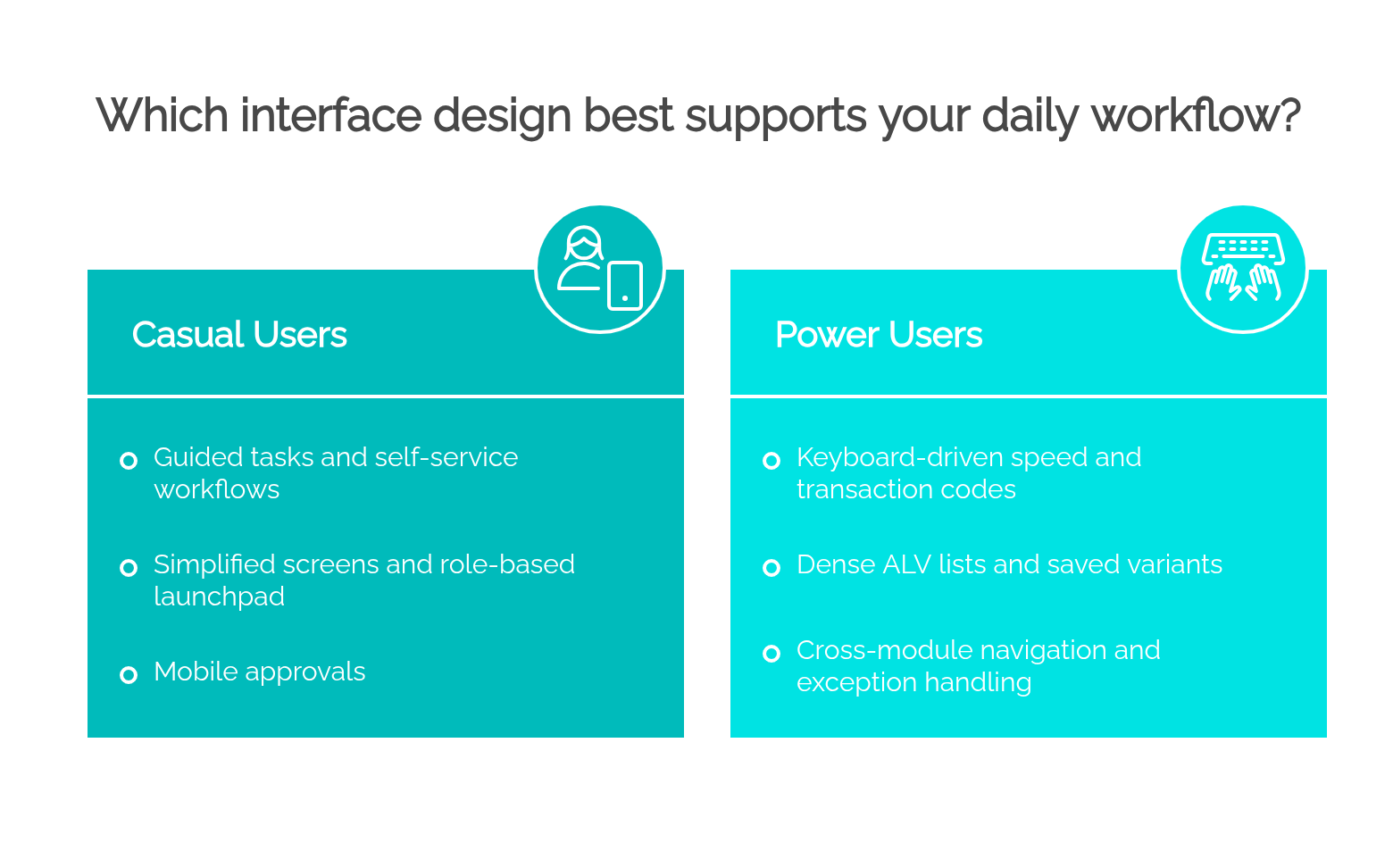
The point of this article is not that SAP Fiori is bad and SAP GUI is good. The point is that user experience is relative to the user and the task. An interface optimized for clarity and guidance serves one profile; an interface optimized for speed and density serves another. Fiori adoption problems usually appear exactly where those profiles were treated as identical.
Why Power Users Experience Fiori Differently
Power users operate under different constraints than casual users. Their work is characterized by:
- Volume: dozens or hundreds of transaction executions per day, where seconds per execution compound
- Keyboard-driven work: function keys, Enter-key rhythms, and field-to-field tabbing that rarely touch the mouse
- Breadth: quick jumps across many transactions and often across modules
- Density: the need to see many fields, columns, and line items simultaneously to spot anomalies
- Advanced filtering and variants: saved selection screens tuned over years for recurring analyses
- Exports: frequent extraction to Excel for reconciliation and ad hoc analysis
- Exception handling: work that starts precisely where the standard process failed
- Troubleshooting: reproducing another user's problem, which requires visibility beyond one's own narrow role
None of these needs is exotic. They are the operational reality of high-volume SAP work. When a new interface changes the cost of any of them — even slightly — the effect on a power user's day is multiplied by frequency.
The Loss of Transaction Code Speed
Transaction codes deserve a specific discussion, because they are one of the most underestimated productivity mechanisms in SAP.
For an expert, a T-code is not a menu shortcut. It is:
- Direct access:
/nME23N, Enter, and the transaction is open — no search, no scanning, no clicking - Muscle memory: the sequence executes without conscious thought, like touch typing
- Fast switching:
/nand/oallow instant switching or parallel sessions across related transactions - Repeatable execution: the same transaction, the same variant, dozens of times a day with near-zero navigation cost
Fiori replaces this model with tiles, launchpad search, semantic navigation, the App Finder, and spaces and pages. These mechanisms are genuinely good at their job: they make functionality discoverable, they organize work by role, and launchpad search (including its ability to launch apps by typing part of the name) is faster than many critics assume. Users can also add apps to their own pages, which partially recreates a personal fast-access layer.
But "discoverable" and "instant" are different qualities. Searching for "Manage Purchase Orders," waiting for the app to load, and clicking into it is a different physical and cognitive operation than typing ME23N. For a user who opens that transaction three times a week, the difference is irrelevant. For a user who opens it forty times a day, it is not. Fiori's navigation model is a real improvement for orientation — and a real cost for velocity. Both statements are true, and adoption strategies that acknowledge only one of them will misjudge the reaction of expert users.
Data Density: Why "Simpler" Can Feel Slower
One of Fiori's core design principles is simplification: fewer fields, cleaner layouts, progressive disclosure. For casual users, this reduces errors and training time. For power users, it can invert the productivity equation.
Consider the difference in practice:
- A classic ALV list can show dozens of columns on one screen, sortable and filterable in place, with totals and subtotals visible at once. An expert scans it like a spreadsheet, spotting the one line that doesn't belong.
- A Fiori list report may show fewer columns by default, push detail into an object page, and require navigation into and back out of individual items to see information that a dense transaction displayed inline.
- What was one screen with tabs (think of the structured density of
ME23NorVA03) can become an object page with sections that require scrolling, expanding, and drilling.
Scrolling replaces scanning. Navigation replaces peripheral vision. For a user whose job is pattern recognition across hundreds of records, this is not a cosmetic change — it changes how long the work takes.
The design intent is sound: progressive disclosure protects casual users from complexity. But the conclusion for rollout teams should be equally clear: a simpler screen is not always a faster screen. Simplicity optimizes for comprehension; density optimizes for throughput. Expert work often needs the second.
Fragmented Journeys: When One Transaction Becomes Several Apps
SAP Fiori frequently decomposes broad transactions into task-specific apps. This is deliberate and often beneficial: a warehouse clerk who only confirms tasks doesn't need the full complexity of a monitor transaction. But for users who worked across the full breadth of a transaction, decomposition fragments the journey.
Some concrete patterns:
- Purchasing: Work that lived in
ME21N/ME22N/ME23N— creating, changing, displaying, checking history, and jumping to related documents — may now span Manage Purchase Orders, Manage Purchase Requisitions, and separate monitoring or approval apps. Each app is clearer; the journey across them is longer. - Finance operations: A financial accountant who used
FBL1N/FBL3N/FBL5Nline item displays as a home base now works across multiple Manage/Display Line Items apps, with different navigation paths to clearing, document display, and corrections. - Quality notifications: Processing that happened inside one notification transaction may be split between creation, processing, and analytical apps.
- Warehouse and logistics: Monitoring, exception handling, and execution can be distributed across apps that were previously views within one cockpit-style transaction.
- Reporting and exception handling: An expert investigating a discrepancy often needs to pivot from a report to a document to a master record and back. In GUI, this was parallel sessions and T-code jumps. In Fiori, it depends on how well semantic navigation was configured — and whether the target apps are even in the user's role.
Task-specific apps improve clarity for task-specific roles. But power users are, almost by definition, cross-task workers. For them, decomposition converts one dense workspace into a multi-app itinerary, and the rollout needs to acknowledge and design for that journey rather than assume the sum of the parts equals the old whole.
Role-Based Access and Discoverability
Role-based access is one of Fiori's structural strengths: users see what their role needs, security is cleaner, and the launchpad stays focused. But the same mechanism creates friction patterns that GUI users never faced:
- Invisible functionality: In SAP GUI, a user without authorization for a transaction could still see it exists. In Fiori, an app that isn't in your catalog simply doesn't appear. Users can't distinguish "I don't have access" from "this function doesn't exist in Fiori."
- The mapping problem: Users know the transaction they need. They don't know which app replaced it, whether it was replaced at all, or whether the replacement covers their scenario. Without a reference, they conclude Fiori "can't do it."
- Support visibility: Power users troubleshooting for colleagues often need to see more than their own role grants. Narrow role design that is perfectly adequate for a line worker can cripple the person supporting that line worker.
- Governance overhead: App discovery isn't self-organizing. Someone has to curate catalogs, spaces, and pages — and keep them curated as the app landscape evolves with each release.
A practical mitigation many organizations adopt is an internal app catalog: a maintained reference that lists available Fiori apps, the GUI transactions they relate to, the roles that contain them, known limitations, and who to contact for access. It is unglamorous documentation work, and it consistently ranks among the highest-value adoption artifacts a project can produce.
Performance and Trust
Performance is where Fiori adoption is won or lost with expert users, because their tolerance is calibrated by frequency.
Common friction points include:
- Launchpad load time, especially on first login or after cache invalidation
- Over-assigned roles and catalogs, which inflate the launchpad content the browser must process
- Browser behavior: memory consumption, tab discipline, and cache configuration all affect perceived speed
- Network conditions, particularly for remote plants, warehouses, and home offices
- Backend service performance: OData response times depend on gateway configuration and backend tuning, not just frontend design
- Undersized test systems: pilots run on QA environments with fewer resources, so users' first impression of Fiori is slower than production will be — and first impressions persist
- App-switching cost: each navigation between apps carries loading overhead that a
/nT-code jump never had
Here is the arithmetic that project teams often miss: a delay of three seconds is nothing for a manager approving five requests a day. For a power user executing a task 200 times a day, three seconds per execution is ten minutes of pure waiting — daily. Small delays repeated hundreds of times become a serious productivity issue, and they become a trust issue faster than that. Once expert users decide the new interface is slow, they stop giving it second chances.
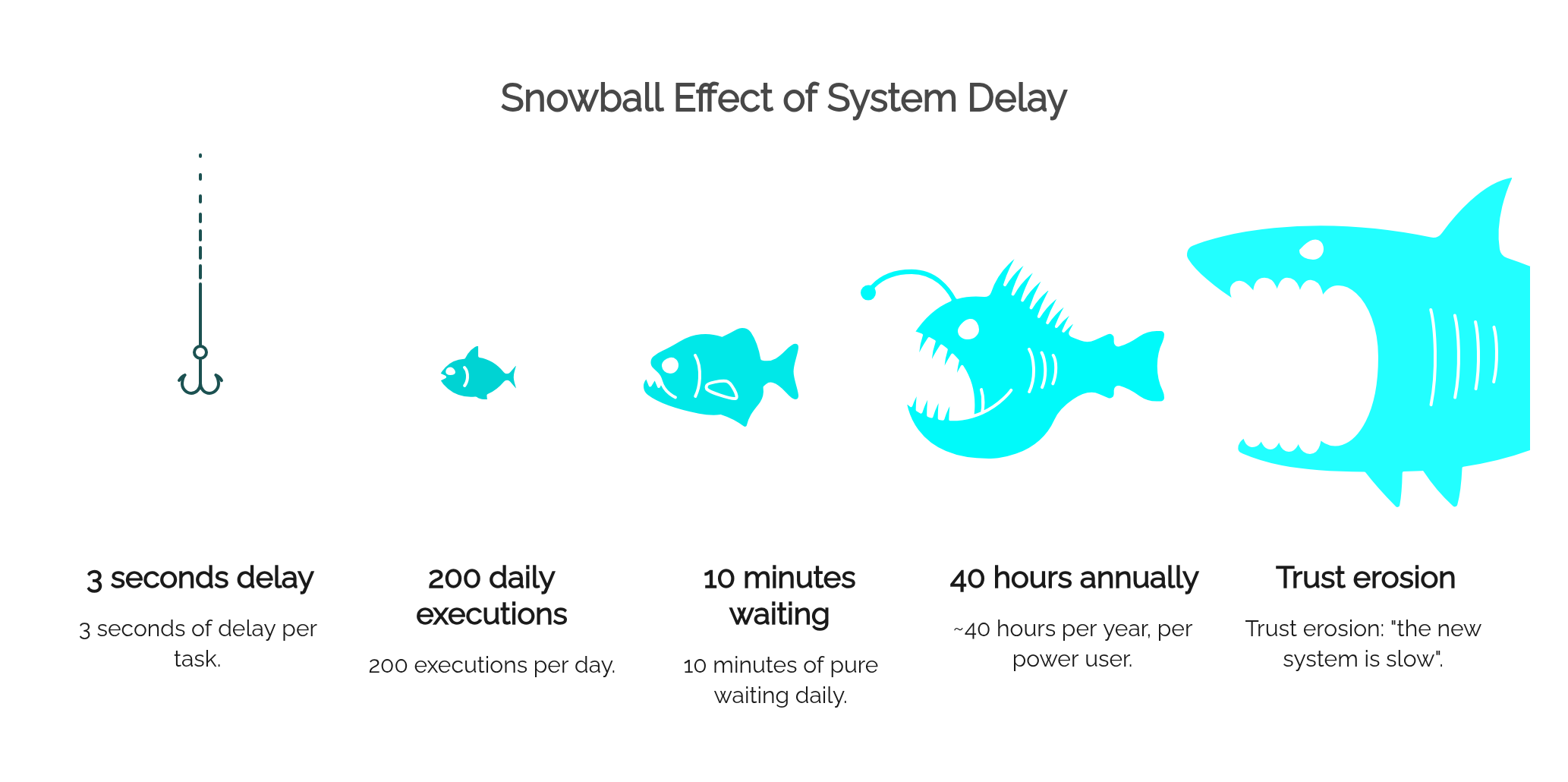
Performance testing with real power-user workloads, on realistic infrastructure, before go-live is not optional hardening. It is adoption strategy.
Training Power Users Is Different
Generic end-user training — "here is the launchpad, here is how you search, here is how you open an app" — is close to useless for power users, and can actively irritate them. They don't need to learn how to use software. They need to relearn where their expertise lives.
Their questions are specific:
- "Where did this function go?" — which requires transaction-to-app mapping, not feature tours
- "How do I recreate my variants?" — which requires training on Fiori filter bars, saved views, and adapt-filters functionality
- "How do I find apps that aren't on my launchpad?" — App Finder, search, and the access request process
- "What can't Fiori do yet?" — honest documentation of gaps and limitations, which builds far more trust than pretending parity exists
- "When should I still use SAP GUI?" — explicit guidance, because power users will discover the answer anyway, and it's better if the project provides it
Just as important as content is timing. Power users should be involved before rollout — in fit-gap sessions, testing, and launchpad design — not handed training material after go-live. Training an expert after the decisions are made converts a potential ally into a critic with credibility.
Why Power Users Should Be Involved Early
Beyond training, power users are the single most valuable validation resource an SAP Fiori project has, because they know where the process actually bends:
- Validating functional coverage: confirming that the Fiori apps chosen actually cover the scenarios the department runs, including the ugly ones
- Identifying missing fields or actions: spotting that a field used daily for a workaround isn't exposed in the new app
- Testing real scenarios: month-end, year-end, peak season, and exception flows — not just the happy path in the test script
- Comparing workflows honestly: timing old versus new for high-frequency tasks, producing evidence instead of opinions
- Finding exception cases: the credit-blocked order, the partially delivered PO, the reversed goods movement — the cases that determine whether an app is usable in practice
- Supporting training: peer-delivered training from a respected key user outperforms any external material
- Shaping role-based launchpads: deciding which apps belong on which pages for which roles, based on how work actually flows
- Mapping productivity impact: identifying honestly where Fiori improves the work and where it slows it down
There is also a political reality: power users influence their departments. If the people colleagues trust say "the new system is fine, and here's how to use it," adoption follows. If they say "it's slower and half our stuff is missing," no communication campaign will outweigh them.
Common Mistakes in Fiori Adoption for Power Users
The same failure patterns recur across projects:
- Assuming modern UI means better productivity — treating visual modernization as automatically equivalent to workflow improvement
- Forcing Fiori-only policies too early — banning SAP GUI before Fiori coverage and performance justify it
- Ignoring transaction-heavy work — designing the rollout around approvals and self-service while the highest-volume users are transactional workers
- Giving too many tiles without curation — an uncurated launchpad with 200 tiles is a worse menu than the one it replaced
- Hiding required apps behind restrictive roles — role minimalism that breaks support and troubleshooting workflows
- Failing to map GUI transactions to Fiori apps — leaving users to guess where their work went
- Replacing one transaction with several apps without explaining the new journey — decomposing the workflow without documenting the new path through it
- Not testing performance with real users — validating apps functionally on fast networks and empty systems, then discovering latency in production
- Treating power user complaints as resistance instead of feedback — the most expensive mistake, because it discards the project's best source of ground truth
A Better Adoption Strategy
A rollout that works for power users is built on segmentation and honesty rather than uniform mandates:
- Segment users by profile. Casual users, managers, mobile workers, and power users have different needs. Design the rollout per segment, not per system.
- Identify which tasks are better in Fiori. Approvals, self-service, mobile confirmations, analytical overviews — move these confidently.
- Identify which tasks should remain in SAP GUI, for now. High-volume transactional work, dense-list analysis, and scenarios with known Fiori gaps. Naming these openly is a sign of a mature project, not a failing one.
- Create and maintain a transaction-to-app mapping. This single document answers the most common power user question before it's asked.
- Design role-based launchpads carefully. Curated spaces and pages per role, built with key user input, reviewed as the app landscape evolves.
- Publish an internal Fiori app catalog. Apps, related transactions, roles, limitations, and access contacts in one findable place.
- Involve power users in testing — including performance testing under realistic volume, not just functional sign-off.
- Document known limitations. Users forgive gaps they were told about. They don't forgive gaps they discovered after being promised parity.
- Provide real feedback channels. A visible mechanism for reporting friction, with visible responses, converts complaints into improvement input.
- Adopt a hybrid strategy where appropriate. Which leads to the final point.
SAP Fiori and SAP GUI Can Coexist
There is a persistent assumption in rollout planning that GUI usage after go-live represents adoption failure. In most real S/4HANA landscapes, it represents something else: a sensible division of labor.
A mature interface strategy typically looks like this:
- Fiori for guided tasks, mobile scenarios, approvals, self-service, manager actions, and analytical entry points — the scenarios where it is clearly the better tool
- SAP GUI (including GUI transactions embedded in the launchpad) for dense, repetitive, technical, or expert workflows where transaction speed and screen density still win
- The Fiori Launchpad as a common entry point where useful, since it can host both native apps and classic transactions, giving users one front door without forcing one interaction model
- Clear documentation stating which interface is recommended for each process, so the choice is deliberate rather than accidental
SAP itself has moved in this direction: S/4HANA continues to support GUI transactions, and the launchpad architecture explicitly accommodates classic UIs alongside Fiori apps. Coexistence is not a compromise waiting to be eliminated on a deadline. It is a transition strategy that lets each interface do what it does best, while Fiori coverage, performance, and user familiarity grow release by release.
Final Answer
SAP Fiori adoption is harder for power users because they are not merely using screens — they are using years of accumulated process knowledge, transaction patterns, keyboard shortcuts, variants, and cross-functional navigation habits. When an interface change touches all of that at once, resistance is not an attitude problem; it is a measurement of real cost.
A successful rollout respects that expertise. It introduces Fiori where it demonstrably improves the work, keeps SAP GUI where it remains the better tool, maps the old world to the new one explicitly, tests performance at expert volumes, and treats power users as design partners rather than adoption targets. Teams that design around real user roles and real business processes get both outcomes: modern experiences where they add value, and expert productivity where it matters most.
FAQ
Why do SAP power users often prefer SAP GUI?
Because their productivity is built on transaction codes, keyboard-driven navigation, dense ALV-style screens, saved variants, and fast switching between related transactions. SAP GUI is optimized for high-frequency expert work, so for many transactional tasks it remains genuinely faster for experienced users — the preference is operational, not nostalgic.
Is SAP Fiori bad for power users?
No. SAP Fiori offers power users real advantages in analytical apps, workflow inboxes, mobile access, and search-driven navigation. Problems arise when high-volume, dense, transactional work is moved to simplified apps without assessing the productivity impact. The issue is fit, not quality.
Can power users use SAP GUI and Fiori together?
Yes. SAP GUI transactions remain available in S/4HANA and can even be launched from the Fiori Launchpad. A hybrid setup — Fiori for guided, mobile, and analytical scenarios; GUI for dense transactional work — is a common and legitimate strategy in mature S/4HANA landscapes.
Should companies force all users to move to SAP Fiori?
Generally no, and especially not on a fixed deadline detached from functional coverage and performance. Fiori-only mandates imposed before the app landscape covers expert scenarios tend to produce workarounds, shadow processes, and loss of trust. Migration by task and user segment works better than migration by decree.
Why does SAP Fiori feel slower for experienced users?
Three compounding reasons: navigation cost (searching and loading apps versus typing a T-code), interaction cost (scrolling and drilling into object pages versus scanning dense lists), and technical latency (launchpad and OData load times). Each cost is small, but power users repeat operations hundreds of times a day, so seconds multiply into meaningful lost time.
How can teams improve SAP Fiori adoption among power users?
Involve them before go-live in testing and launchpad design, provide transaction-to-app mapping, curate role-based launchpads, test performance under realistic volume, document known limitations honestly, offer expert-level training focused on "where did my function go," and allow SAP GUI where it remains the better tool.
What should be documented before moving power users to Fiori?
A transaction-to-app mapping, an internal Fiori app catalog with roles and access contacts, known functional gaps and limitations per app, guidance on which interface to use per process, variant and filter migration instructions, and the feedback channel for reporting issues.
Are transaction codes still relevant in S/4HANA?
Yes. S/4HANA continues to support a large number of classic transactions through SAP GUI and GUI for HTML, and many organizations run core transactional processes on them today. Some transactions have been replaced or deprecated in favor of Fiori apps, so relevance should be checked per transaction — but T-codes as a working model are far from gone.
When is SAP Fiori better than SAP GUI for power users?
For analytical overviews and KPI-driven monitoring, workflow and approval handling via My Inbox, situations requiring mobile access, cross-application search, and newer S/4HANA functionality delivered only as Fiori apps. In these scenarios Fiori isn't just equivalent — it does things SAP GUI cannot.
What is the best SAP Fiori rollout strategy for key users?
Segment by user profile and task, pilot with key users early, build the transaction-to-app mapping together, define curated role-based launchpads, validate performance at real transaction volumes, run Fiori and SAP GUI in parallel during transition, and expand Fiori scope based on measured productivity rather than a fixed cutover date.