Business Process Documentation: How to Create Clear and Scalable Workflows

If your company relies on undocumented processes, you are already losing efficiency.
Employees improvise, knowledge gets lost, and scaling becomes chaotic.
Business process documentation solves this by turning how work is done into a clear, repeatable system.
In this guide, you’ll learn:
- Real examples and templates you can use as a starting point
- How to document a business process step by step
- Key elements every effective process documentation should include
- A complete checklist to validate your documentation
- Best practices used by high-performing organizations
- ⚠️ Common mistakes to avoid
- The difference between process documentation and process mapping
- How to assess your organization’s documentation maturity
What is Business Process Documentation?
Business process documentation is the practice of creating a clear and structured record of how a process is executed within an organization.
It typically includes written instructions, diagrams, and supporting information that describe the exact steps, roles, inputs, and expected outcomes of a task or workflow.
In simple terms, it transforms how work is done—from informal knowledge stored in people’s heads into a standardized and accessible guide.
Why is Business Process Documentation Important?
The main goal of process documentation is to ensure consistency, efficiency, and transparency in business operations.
By clearly defining how tasks should be performed, organizations can:
• Reduce errors and variability
• Improve training and onboarding
• Increase operational efficiency
• Enable process improvement and automation
• Scale operations more effectively
Without proper documentation, processes become dependent on individuals instead of systems—making the organization more fragile and harder to grow.
Business Process Documentation Examples (Free Templates)
Before diving into theory, here are real examples of business process documentation used in everyday operations.
These templates show how processes can be structured, standardized, and easily understood by teams.
- Hiring Process – A structured workflow for recruiting and selecting candidates
- Employee Onboarding – A complete process covering all steps from hiring to integration
- Termination of Employment – A controlled process to ensure compliance and proper offboarding
Each example includes clear steps, roles, and decision points—so you can use them as a reference or starting point.
👉 Download the documentation templates and use them in your organization.
- Example 1 – Hiring Process (PDF)
- Example 2 – Employee Onboarding (PDF)
- Example 3 – Termination of Employment (PDF)
Explore more real-world workflows in our BPMN examples library and see how processes are structured in practice.
Key Elements of Business Process Documentation
To be truly useful, process documentation must contain specific elements that provide clarity, context, and actionable guidance.
Document Details and Metadata
Every process document should start with basic identifying information:
- Title: A clear, descriptive name for the process.
- Document Owner: The person or role responsible for maintaining the document.
- Approval Date: The date the current version was officially approved.
- Revision Date: The date of the last update.
- Version Number: To track changes over time.
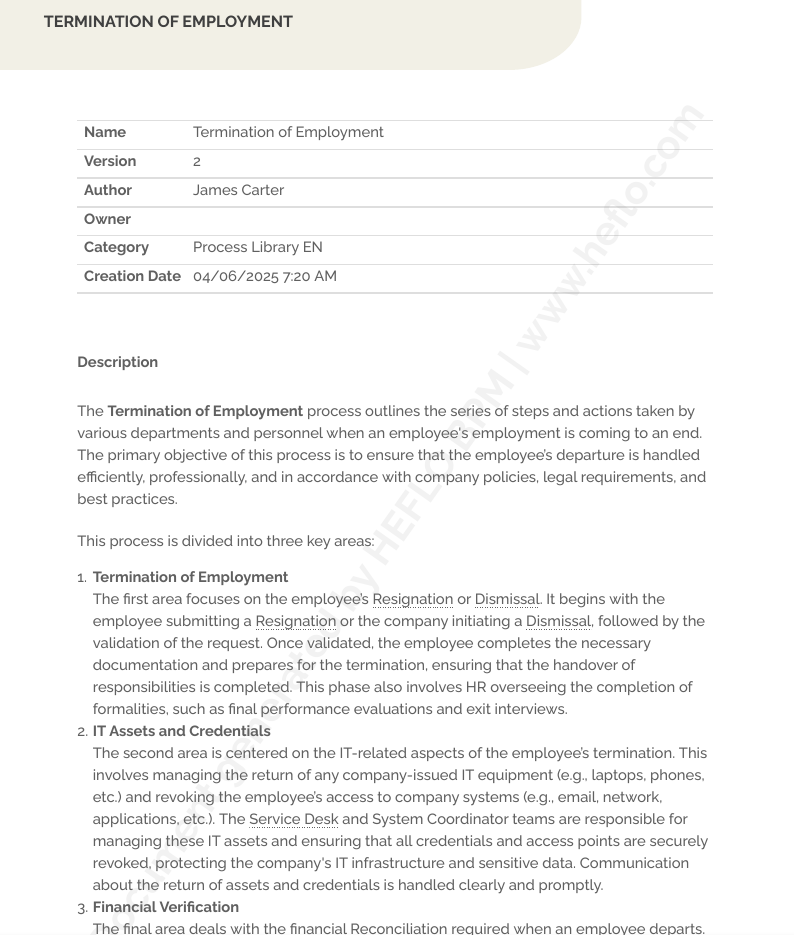
The image below shows an example of documentation metadata. With HEFLO, you can enhance this metadata by adding custom fields at both the process and task levels.

Purpose Statement and Scope Definition
- Purpose Statement: Clearly explains why the process exists, its goals, and the expected outcome or result upon successful completion. This provides context and motivation.
- Scope: Defines the boundaries of the process – where it starts and ends. It also identifies the intended audience (who should use this document) and the specific circumstances or triggers for invoking the process.
Procedure Overview and Process Flow
- Procedure Overview: A brief summary or abstract of the process steps, giving the reader a high-level understanding before diving into details. See an example in the image below.
- Process Flow: Often a visual representation like a flowchart or diagram (e.g., swimlane diagram, process map) illustrating the sequence of steps and decision points. This provides an intuitive grasp of the workflow. Below is another example of a diagram embedded in the documentation.

Detailed Step-by-Step Instructions
This is the core of the document. It provides a sequential, in-depth description of each task required to complete the process. Each step should be clear, concise, and actionable. It should specify:
- What action needs to be taken.
- How to perform the action.
- Any necessary tools, systems, or materials.
- Tips or important considerations for the step.
Check out the image below for an example of how a task is documented within a business process.

Role Assignments and Responsibilities
Clearly identify who is responsible for performing each step or task within the process. This eliminates ambiguity and ensures accountability. Often represented using roles (e.g., "Sales Representative," "Finance Clerk") rather than specific names.
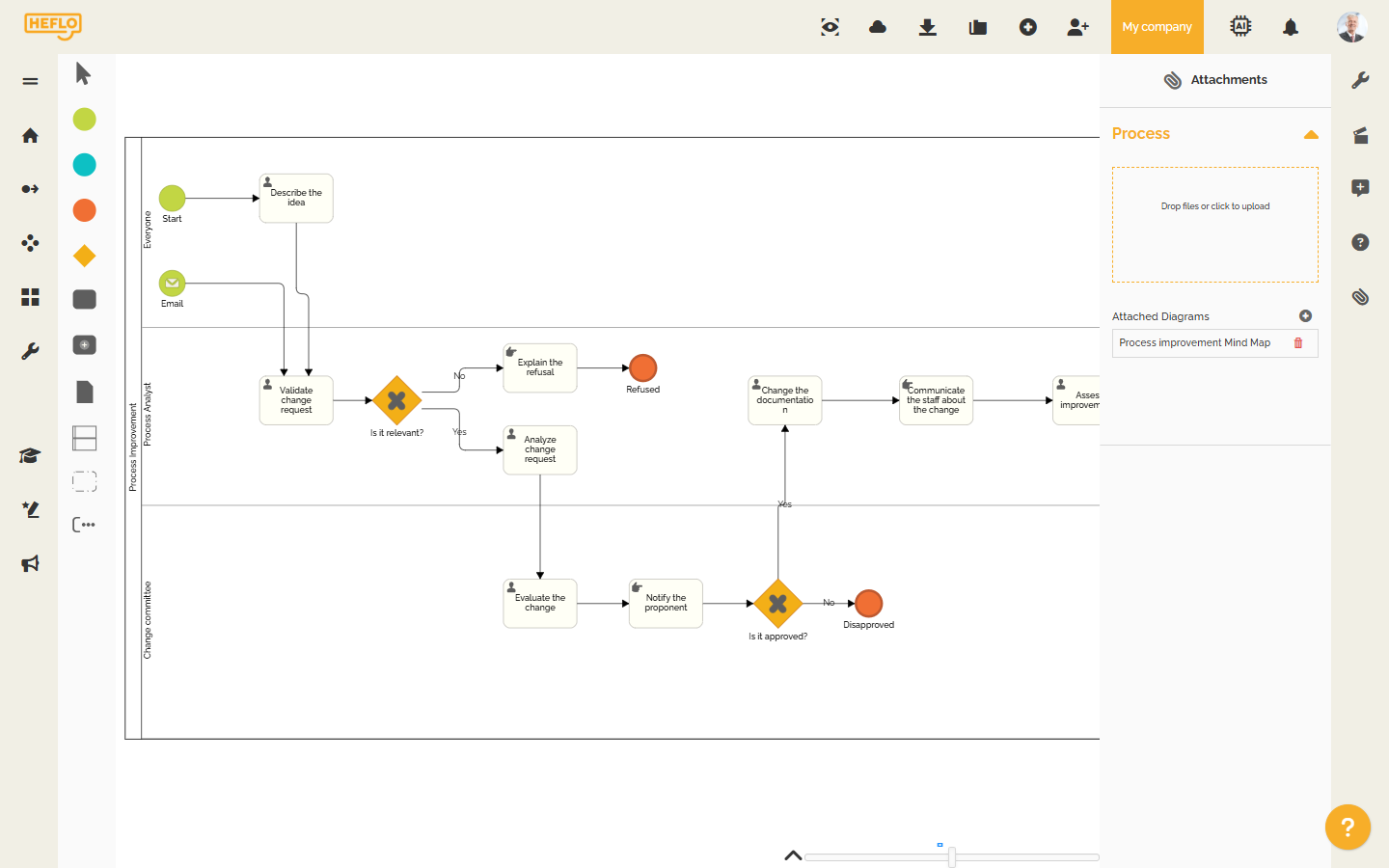
In a BPMN diagram, responsibilities are defined using horizontal pools and lanes. See the example in the image below.

Supporting Information and References
Include or link to any additional information needed to execute the process effectively:
- Definitions: Explanation of any jargon, acronyms, or sector-specific terms used.
- References: Links to related documents, policies, forms, templates, external websites, or other relevant materials.
A good approach is to create a glossary of technical terms. Below is an example of a documented glossary.

Approval Signatures and Version Control
- Approval: Signatures (physical or digital) of the individuals who have reviewed and formally approved the documented process. This signifies official acceptance.
- Version Control: A system (often a log within the document or managed by software) to track changes, dates, authors of changes, and version numbers. This ensures users are always working with the most current, approved procedure.
How to Document a Business Process (Step-by-Step)
Creating effective process documentation is a systematic activity. Following these steps ensures thoroughness and usability.
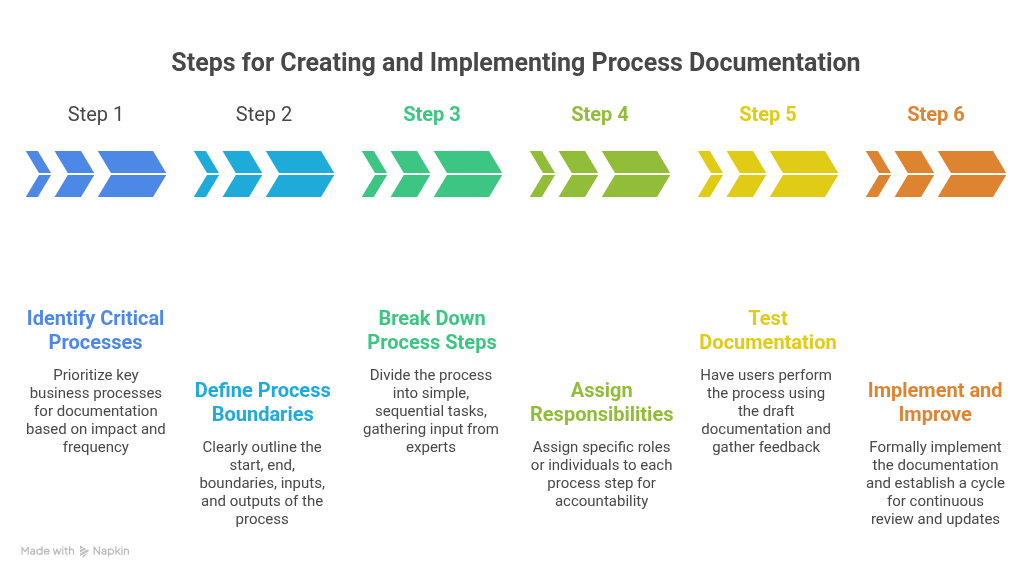
Step 1 - Identifying Critical Processes for Documentation
You can't document everything at once. Start by identifying which processes are most critical to business operations, have the highest impact, are prone to errors or inconsistencies, are frequently performed, or are required for compliance. Prioritize these for documentation efforts. Start small with a few key processes.
Also, understand why you are documenting this specific process. What are the goals? (e.g., improve training, reduce errors, ensure compliance). Based on the objectives and the nature of the process, choose the most appropriate documentation format (e.g., SOP, flowchart, checklist, video).
Step 2 - Defining Process Boundaries, Inputs, and Outputs
Clearly define the scope:
- Start Point: What triggers the process?
- End Point: What signifies the successful completion of the process?
- Boundaries: How does this process interact with other tasks, processes, or teams?
- Inputs: List all the resources, information, materials, or triggers required to start and execute the process.
- Outputs: List the expected results, products, information, or outcomes produced upon completion of the process.
Step 3 - Breaking Down and Organizing Process Steps
This is the core mapping activity. Break the entire process down into individual, sequential, and simple tasks. Each step should represent a distinct action. Gather input directly from the team members who actually perform the process – they are the subject matter experts. Organize these steps logically.
Step 4 - Assigning Responsibilities to Team Members
For each step identified, clearly assign responsibility to a specific role or individual. This clarifies accountability and ensures everyone knows their part in the process flow. Use role titles rather than individual names for longevity.
Step 5 - Testing Documentation with Actual Users
Before finalizing, test the documentation by having actual users (ideally someone less familiar with the process) attempt to perform the process using only the draft document. Observe where they struggle, get confused, or where the documentation is unclear or inaccurate. Gather their feedback.
Step 6 - Implementation and Continuous Improvement
Once tested and refined, formally implement the documentation. Ensure everyone involved is aware of the new or updated documented process, knows where to find it, and has access to any necessary resources mentioned. However, documentation is not static. Establish a cycle for continuous improvement. Periodically review the process and its documentation, gather ongoing feedback, and make updates as needed to reflect changes or improvements.
✅ The Complete Process Documentation Checklist
Use this checklist to ensure your process documentation is clear, complete, and effective:
1. Define the Process Scope
- Is the start and end of the process clearly defined?
- Is the objective of the process documented?
- Is it clear why this process matters?
2. Identify Stakeholders and Roles
- Are all participants in the process identified?
- Are responsibilities clearly assigned?
- Were stakeholders involved in validating the process?
3. Structure the Process Flow
- Are all steps described in the correct sequence?
- Are decision points clearly defined?
- Are inputs and outputs identified?
4. Keep Documentation Clear and Usable
- Is the process easy to understand?
- Is unnecessary complexity avoided?
- Are steps focused on “what to do” instead of system instructions?
5. Add Supporting Information
- Are business rules documented?
- Are exceptions or variations included?
- Are related documents (templates, mind maps, etc.) linked?
6. Validate and Publish
- Was the process reviewed by stakeholders?
- Is the documentation accessible in a central location?
- Can users easily find and navigate the process?
7. Maintain and Improve
- Is there a defined review cycle?
- Is there a process owner responsible for updates?
- Can users suggest improvements or feedback?
- Is there a formal process to receive and manage improvement suggestions for new versions?
A well-documented process is not just complete—it is clear, usable, and continuously improved over time.
To see how this works in practice, you can explore a real process improvement example and interact with it directly.
👉 Open and explore a process improvement workflow in HEFLO
Best Practices for Effective Process Documentation
Following best practices ensures your documentation is not just created, but actually used and valued.
Creating Clear, Concise, and Accessible Content
- Be Straightforward: Use simple, clear, and concise language. Avoid jargon, acronyms (or define them), and overly technical terms unless necessary for the target audience.
- Be Action-Oriented: Start steps with action verbs.
- Adopt a Conversational Tone: Make it easy to read and understand.
- Ensure Accessibility: Store documentation in a centralized, easily searchable location (e.g., cloud-based repository, knowledge base) that all relevant stakeholders can access from anywhere.
Utilizing Templates for Consistency
Use standardized templates for different types of process documents (SOPs, checklists, etc.). Templatize ensures a consistent format, look, and feel across all documentation. This makes documents easier to create, read, use, and update, reducing errors and improving professionalism.
👉 Want more inspiration? Check out our next post, packed with real documentation examples and free downloadable templates to help you get started!
Incorporating Visual Elements for Better Understanding
Humans process visuals faster than text. Incorporate visuals like flowcharts, diagrams, screenshots, videos, graphs, and tables wherever they can clarify complex steps, illustrate workflows, or improve learning and retention.
Linking Related Documents for Comprehensive Knowledge
Processes rarely exist in isolation. Link to related documents – other procedures, policies, forms, templates, reference materials – directly within the documentation. This creates a connected knowledge base and allows users to easily access all relevant information without extensive searching, enhancing efficiency.
In this example, the process is linked to a related document in the form of a mind map.
Implementing Regular Review and Update Cycles
Outdated documentation is worse than no documentation, as it leads to errors and misinformation. Establish a formal schedule for regular review and updates (e.g., annually, or whenever a process changes). Make the update process easy and track changes diligently using version control.
Prioritizing and Segmenting Documentation Efforts
Don't try to boil the ocean. Prioritize documenting the most critical, high-impact, or problematic processes first. Segment documentation logically – create separate documents for distinct processes rather than one massive, confusing manual. This makes information easier to find and manage.
Involving All Relevant Stakeholders in the Process
One of the biggest challenges in process documentation is ensuring that stakeholders actually use it in their daily work.
When documentation is stored in isolated files or scattered across different systems, it becomes difficult to access, trust, and keep updated.
A more effective approach is to make processes available in a centralized, easy-to-navigate environment where stakeholders can quickly find and follow the correct workflow.
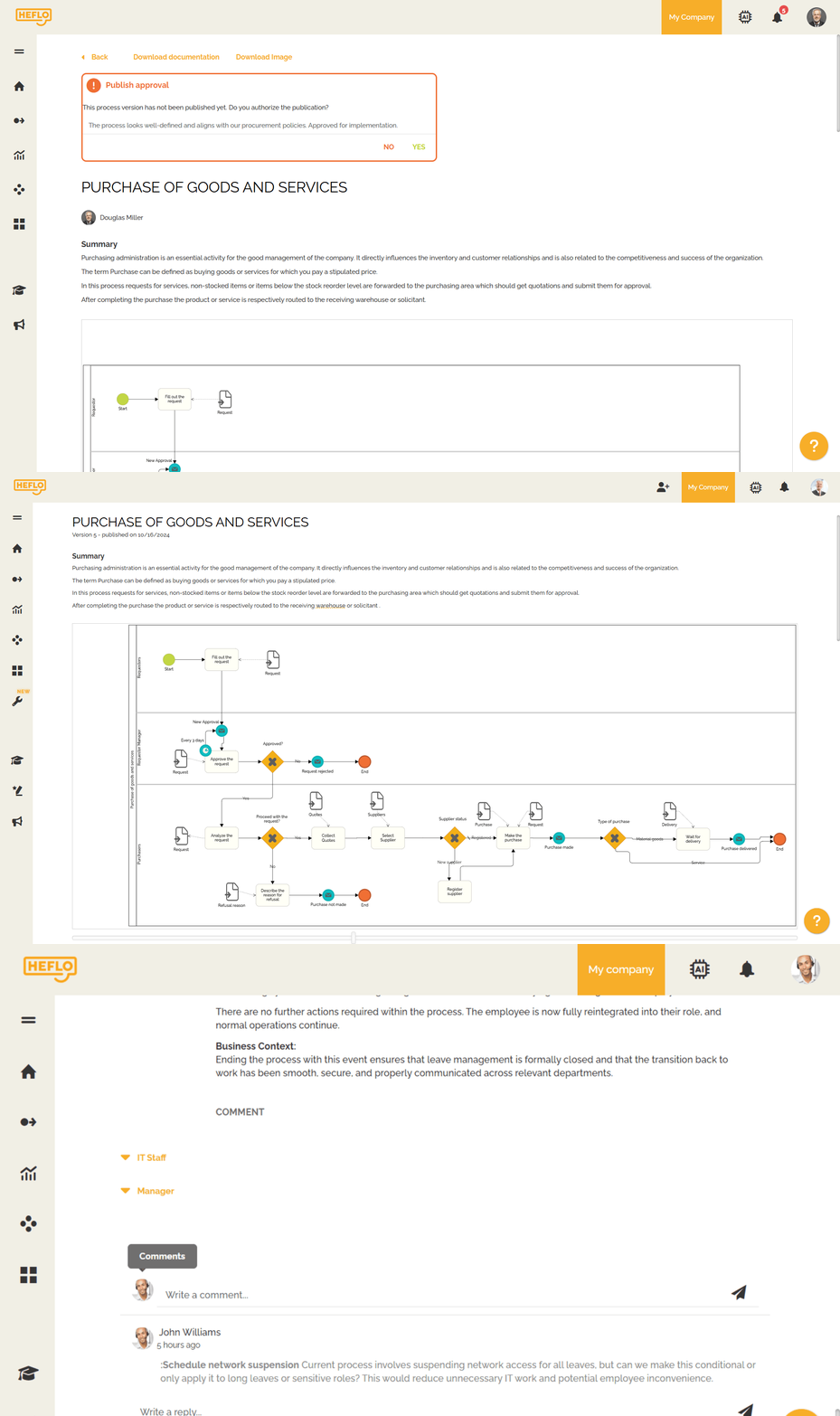
In this example, processes are published in a shared portal, where stakeholders can not only access standardized workflows but also review updates, approve new versions, and submit improvement suggestions.
This creates a continuous feedback loop, helping organizations keep their processes accurate, aligned, and constantly evolving.
This approach helps transform documentation from a static artifact into a living system that evolves with the organization.
🎥 To better understand who stakeholders are and why they play a critical role in processes, watch the short explanation below:
⚠️ Common Mistakes in Process Documentation
Even when organizations invest time in documenting processes, common mistakes can reduce the effectiveness of their efforts.
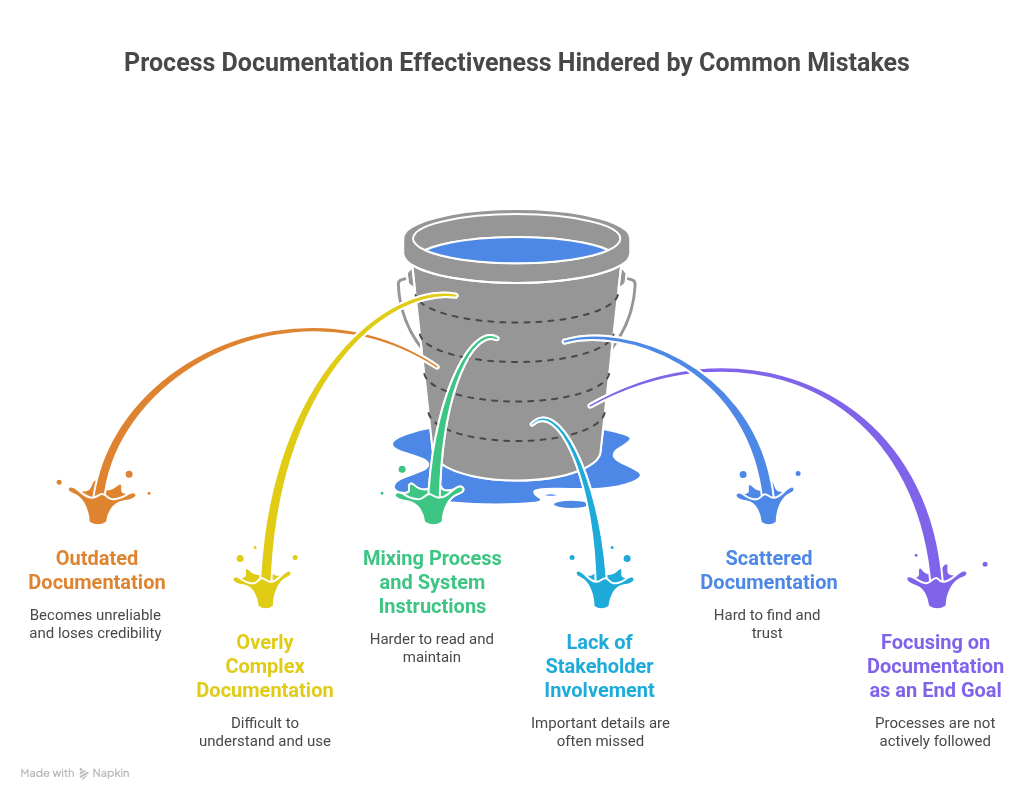
One of the most frequent issues is 👉 documentation that is never updated. Processes naturally evolve over time, but documentation often remains static. As a result, it quickly becomes unreliable and loses credibility among users.
Another common problem is 👉 overly complex documentation. When processes are described with excessive detail or technical language, they become difficult to understand and discourage people from using them in their daily work.
A related mistake is 👉 mixing process documentation with system instructions. Instead of describing what needs to be done, documentation often turns into step-by-step tutorials on how to use a specific system. While this level of detail can be useful, it does not belong in the core process description.
Process documentation should focus on the sequence of activities, responsibilities, and decision points. Detailed system instructions—such as where to click or how to fill out a form—should be documented separately, for example, as work instructions or user guides. When these elements are mixed, processes become harder to read, maintain, and adapt—especially when systems change.
👉 Lack of stakeholder involvement is also a critical mistake. When documentation is created without input from those who actually execute the process, important details are often missed, and adoption tends to be low.
In many organizations, documentation is also 👉 scattered across multiple tools and files, making it hard to find and trust. Without a central and accessible location, even well-documented processes end up being ignored.
Finally, a subtle but important mistake is 👉 focusing on documentation as an end goal. The real objective is not to produce documents, but to create processes that are clear, usable, and actively followed.
Avoiding these pitfalls is essential to ensure that process documentation remains relevant, accessible, and valuable over time.
Process Documentation vs. Process Mapping
Although the terms are sometimes used interchangeably, process documentation and process mapping are not the same thing.
- Process mapping focuses on visualizing how a workflow moves from one step to the next. It helps teams understand the sequence of activities, decisions, and interactions involved in a process.
- Process documentation, on the other hand, goes further. It describes the process in more detail, including responsibilities, rules, inputs, outputs, supporting information, and related instructions.
In other words, process mapping shows the flow, while process documentation provides the context needed to execute and manage the process effectively.
The two approaches work best together. A process map makes the workflow easier to understand, while documentation ensures that people know how the process should be carried out and maintained over time.
📘 If you want to explore this topic in more depth, read our article on business process mapping.
How Mature Is Your Process Documentation?
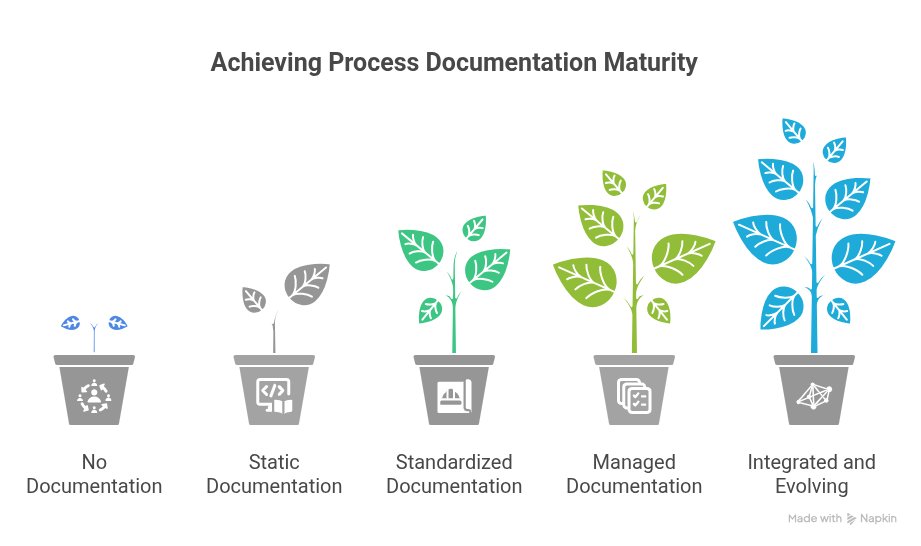
Organizations typically evolve through different levels of maturity when it comes to documenting their processes.
Level 1 – No Documentation
Processes exist only in people’s knowledge. This creates dependency on individuals and leads to inconsistent execution.
Level 2 – Static Documentation
Processes are documented, but rarely updated. Over time, documentation becomes outdated and misaligned with reality.
Level 3 – Standardized Documentation
Processes follow a consistent structure. This improves clarity, usability, and makes it easier to share knowledge across teams.
Level 4 – Managed Documentation
Documentation is actively maintained. Processes are reviewed, updated, and validated with stakeholders on a regular basis.
Level 5 – Integrated and Evolving
Documentation becomes part of a living system. It evolves continuously, integrates with workflows, and supports improvement and automation initiatives.
Where does your organization fit today?
Cloud-Based Solutions for Accessibility and Collaboration
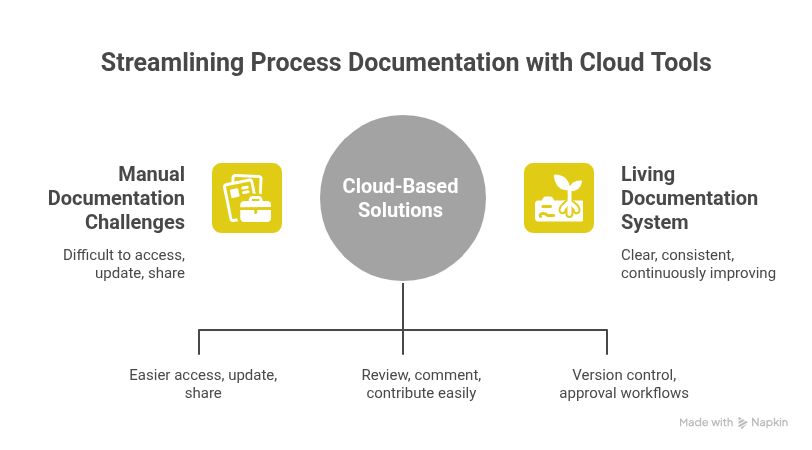
As organizations grow, managing process documentation manually becomes increasingly difficult.
Cloud-based tools help centralize documentation, making it easier to access, update, and share processes across teams. They also improve collaboration by allowing stakeholders to review, comment on, and contribute to process improvements in real time.
Automation features can further reduce effort by supporting version control, approval workflows, and continuous updates—helping ensure that documentation stays accurate as processes evolve.
Ultimately, the value of process documentation is not in creating documents, but in building a system that keeps processes clear, consistent, and continuously improving over time.
Organizations that treat documentation as a living system—not a one-time task—are better positioned to scale, adapt, and maintain operational excellence.
When to Use a Process Documentation Tool
Manual documentation (Word, spreadsheets, static diagrams) works at first—but quickly becomes hard to maintain and scale.
- Processes involve multiple teams
- Documentation gets outdated frequently
- You need standardization and visibility
Tools like HEFLO help you document processes visually, keep them updated, and prepare them for automation.
👉 Create your process documentation now using our free online editor — no installation required.